
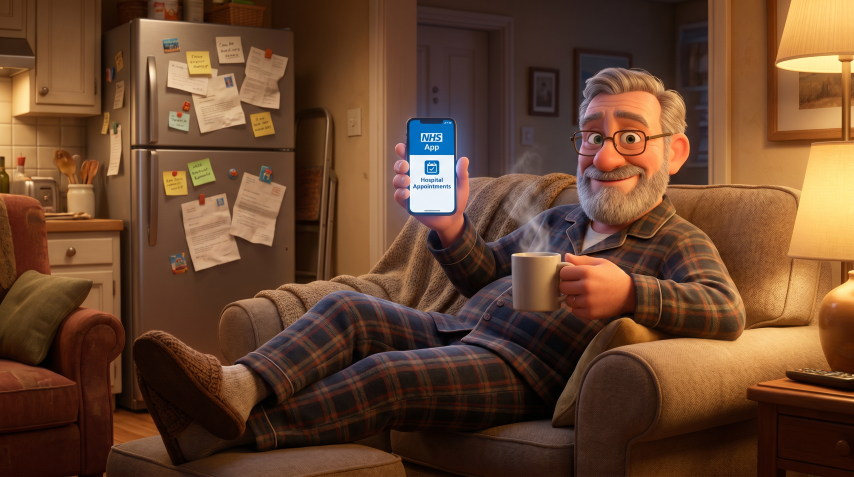
I’ll be honest with you. When I first heard the NHS App could now show me my hospital appointments, I felt a strange mix of relief and mild irritation. Relief because, frankly, it’s about bloody time. Irritation because I’d just spent twenty minutes on hold trying to confirm an appointment that was apparently already in my phone. But here we are, living in 2026, and I’m genuinely excited to tell you about this feature because it’s actually quite brilliant once you understand it.
Why This Matters More Than You Think
Let me paint you a picture. Remember when you’d get that crinkly appointment letter through the post, stick it on the fridge with a magnet, and then spend the next three weeks wondering if you’d remembered the date correctly? Or worse, you’d file it somewhere ‘safe’ and then tear the house apart the night before trying to find it? I’ve been there. We’ve all been there.
The NHS App hospital appointments feature is solving a problem that’s plagued us for decades. It’s not just about convenience, though that’s lovely. It’s about reducing missed appointments, which cost the NHS roughly £1 billion a year. When you miss an appointment, that slot could have gone to someone else. The domino effect is real, and it affects waiting times for everyone.
But beyond the economics, there’s something deeply personal here. Healthcare can be stressful. Hospital appointments doubly so. Having all your information in one place, accessible whenever you need it, takes away one tiny layer of anxiety. And in my book, anything that does that is worth celebrating.
What the NHS App Hospital Appointments Feature Actually Does (And Doesn’t)
Right, let’s get specific because I know you’re wondering what this thing can actually do for you.
When you use the NHS App to check hospital appointments NHS style, you can see your upcoming outpatient appointments. That means appointments at the hospital where you go in, see a specialist or have a test, and then go home again. You’ll see the date, the time, the location, and what the appointment is for. You can also see past appointments, which is surprisingly useful when you’re trying to remember when you last saw the cardiologist or had that scan.
Some hospitals, and this is the clever bit, now let you cancel or reschedule appointments directly through the app. Not all of them, mind you, because the NHS is a massive organization and different hospitals move at different speeds. But when it works, it’s like magic. No phone calls, no waiting on hold, no explaining your date of birth seventeen times to different people.
Now, what it doesn’t do is equally important to understand. This isn’t for GP appointments, those are handled separately in the app under a different section. It won’t show you inpatient stays where you’re actually admitted to hospital overnight. Emergency department visits won’t appear here either, because, well, they’re emergencies and not planned. And if your hospital hasn’t connected their systems to the app yet, you won’t see those appointments. It’s frustrating, I know, but we’re getting there.
The Old Days: A Brief History of Appointment Chaos
Cast your mind back, if you will, to the world before smartphones. Actually, let’s not go back quite that far because I’ll depress myself. Let’s start in the early 2000s.
Back then, everything was paper. You’d receive a letter, sometimes weeks after your GP referred you, telling you when your appointment was. Not asking when suited you, mind, but telling you. If that date didn’t work, you’d have to phone the hospital, navigate a phone system designed by someone who clearly hated humanity, and try to rearrange it. The whole process could take days.
Then came the era of text message reminders, which felt revolutionary at the time. Remember getting that text a few days before your appointment? Suddenly you had a backup reminder system beyond the fridge magnet. It was brilliant, except the text didn’t actually contain all the details you needed, like which department or which floor or whether you needed to fast beforehand.
Some hospitals experimented with their own websites where you could log in and see appointments, but each hospital had a different system. If you were seeing specialists at two different hospitals, you needed two different logins, two different passwords, and the memory of an elephant to keep track of it all.
The NHS tried various patient portal systems over the years, but they were often clunky, difficult to access, and not widely adopted. It was like everyone knew we needed something better, but nobody could quite crack it.
The NHS App Journey: From Humble Beginnings to Hospital Appointments
The NHS App itself launched back in late 2018, and I’ll be honest, it was a bit basic at first. You could view your GP medical records, order repeat prescriptions, and book GP appointments. Useful, certainly, but hardly revolutionary.
The early version was like having a digital version of your repeat prescription slip. Nice to have, but not life-changing. The interface was functional but not exactly intuitive. My mother, bless her, took one look at it and went straight back to phoning the surgery.
Then came the updates, slowly but surely. By 2020, they’d added the ability to view your COVID vaccination records, which suddenly made the app essential for millions of people who needed to prove their vaccination status. That was the moment the NHS App went from ‘nice to have’ to ‘absolutely necessary’, and download numbers went through the roof.
Throughout 2021 and 2022, the app kept improving. They added the NHS COVID Pass for international travel, refined the prescription ordering system, and made the whole thing more user-friendly. The number of registered users climbed into the tens of millions.
But the hospital appointments feature, that took longer. The challenge wasn’t just building the feature in the app, it was connecting all the different hospital systems to talk to the app. Imagine trying to get hundreds of different filing systems, all organized slightly differently, to feed information into one central place. That’s essentially what they had to do.
The initial rollout of hospital appointment viewing started in late 2023, but only with a handful of hospitals. If you were lucky enough to be at one of those pilot sites, you could suddenly see your appointments in the app. For everyone else, it was a frustrating wait.
By 2024, the feature had expanded to cover most major hospital trusts, and by 2025, the vast majority of hospitals in England were connected. Now, in 2026, it’s rare to find a hospital that isn’t showing appointments in the NHS App, though a few smaller or specialist units are still working on it.
The latest version of this feature, which you’re using now, includes those cancellation and rescheduling options I mentioned earlier. It also shows you more detailed information about your appointment, like what to bring, whether you need to prepare in any special way, and how to find the department. Some hospitals even include maps, which is an absolute godsend if you’ve ever tried to navigate a large hospital complex.
How to Actually Use This Thing: A Step by Step Guide
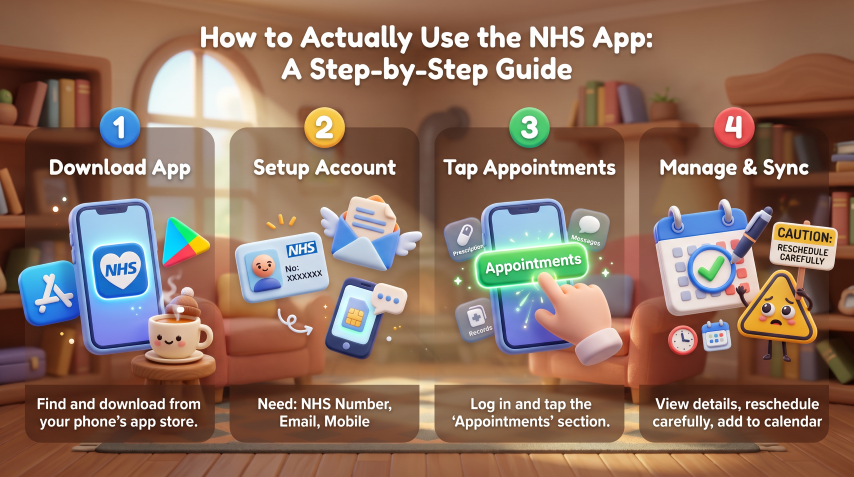
Right, let’s get practical. I’m going to walk you through this as if we’re sitting down with a cup of tea and your phone.
First things first, you need to set up the NHS App if you haven’t already. You’ll need to download it from the App Store if you have an iPhone, or the Google Play Store if you have an Android phone. Just search for ‘NHS App’, and it’s the official one with the NHS logo.
Setting up your account is the bit that puts some people off, but stick with me. You’ll need three things: your NHS number (it’s on any NHS letter you’ve received), an email address, and your mobile phone number. The app will verify your identity by asking you some questions that only you would know, like your postcode or your GP surgery. It’s all quite secure, which I’ll come back to later.
Once you’re in, and I mean properly logged in and verified, you’ll see the home screen. This has several options, and the one you want is usually labelled ‘Appointments’ or ‘Hospital appointments’, depending on which version you have. Tap on that.
Now, here’s where it gets good. You’ll see a list of your upcoming appointments, newest first. Each one shows you the date, time, hospital name, and department. Tap on any appointment to see the full details. You’ll get the exact location, sometimes with a map, any special instructions, and a contact number if you need to call them.
If your hospital supports it, you’ll also see options to cancel or reschedule. This is where you need to be careful, and I mean this seriously. Don’t cancel an appointment unless you’re absolutely sure, because getting a new one might take months depending on the specialty. If you need to reschedule, the app will show you available slots, though there might not be many, especially for specialist appointments.
You can also add appointments to your phone’s calendar directly from the app, which is genuinely useful. It means you’ll get your normal phone reminders as well as the NHS ones.
For past appointments, there’s usually a separate section or a filter you can apply. This is handy for keeping track of your medical history or when you’re trying to remember when you last had a particular test.
The whole process, once you’re set up, takes about thirty seconds to check hospital appointments NHS style. It’s genuinely that simple, and I say this as someone who still has to help their dad with his tablet.
What’s Coming Next: The Future of NHS Digital Appointments
Now we get to the exciting bit, the stuff that’s on the horizon. And I’m cautiously optimistic about where this is heading.
The NHS is working on integrating even more services into the app. We’re talking about test results appearing automatically, which some hospitals are already doing. Imagine having your blood test results pop up in the app as soon as they’re ready, with an explanation of what they mean. No more waiting for a phone call or a letter.
They’re also developing better communication features. Instead of phoning the hospital with a quick question about your appointment, you might be able to message them directly through the app. Some trusts are already trialling this, and the feedback is positive, though I imagine the administrative burden on the NHS side is significant.
There’s talk of virtual appointments being more integrated too. We all got used to video calls during the pandemic, and many hospital consultations can be done remotely. Having these scheduled and accessible through the same app makes perfect sense.
The really clever stuff involves artificial intelligence, and before you roll your eyes, hear me out. AI could help triage appointment queries, suggest the best time to reschedule based on your calendar, or even predict which appointments you’re at risk of missing based on patterns. It’s not about replacing human care, it’s about making the system work more efficiently.
Longer term, and we’re talking several years here, there’s potential for the app to become your complete health hub. All your medical records, all your appointments, all your test results, communication with healthcare professionals, even things like physiotherapy exercises or medication reminders. One app, your entire health journey.
Of course, this all depends on funding, political will, and the technical challenge of connecting even more systems. But the trajectory is clear, and it’s pointing towards a more integrated, digital NHS experience.
The Security Conversation We Need to Have
Right, I need to talk to you about security, and I’m not going to sugarcoat this because it matters.
Your health information is among the most sensitive data you have. The NHS App hospital appointments feature, and indeed the entire app, holds information that you really don’t want falling into the wrong hands. So let’s talk about how it’s protected and what you need to do.
The app itself uses what’s called end-to-end encryption. Think of it like sending a letter in a locked box that only you and the NHS can open. Even if someone intercepted it in transit, they couldn’t read what’s inside. The NHS has to comply with incredibly strict data protection laws, and the app is regularly tested for security vulnerabilities.
But, and this is important, the app is only as secure as your phone and your behaviour. If you use ‘1234’ as your phone passcode, or if you leave your phone unlocked on the bus, that’s a problem. The NHS can’t protect your data if you’re not protecting your access to it.
Here’s what you absolutely must do. First, use a strong passcode or biometric lock (fingerprint or face recognition) on your phone. Second, never share your NHS App login details with anyone, and I mean anyone. Third, if you lose your phone or it gets stolen, report it immediately and change your NHS App password from another device.
The app also has a timeout feature, it logs you out after a period of inactivity. This is annoying when you’re trying to show someone your appointment details, but it’s there for a reason. Don’t disable security features just for convenience.
There have been no major security breaches of the NHS App itself, which is reassuring, but that doesn’t mean we can be complacent. Scammers are getting more sophisticated, and you might receive fake texts or emails claiming to be from the NHS asking you to verify your details or click a link. The NHS will never ask for your password via email or text. If in doubt, don’t click, just open the app directly from your phone.
One vulnerability that worries me is when people use public WiFi to access health apps. Public WiFi in cafes or libraries can be intercepted by people with the right technical knowledge. If you must check your appointments while out, use your phone’s mobile data rather than public WiFi. It’s more secure.
Finally, keep your phone’s operating system and the NHS App itself updated. Those updates often include security patches that fix newly discovered vulnerabilities. Yes, updates can be annoying, but they’re essential.
Wrapping This All Up
So here we are, at the end of our journey through the NHS App and its hospital appointments feature. And honestly, I’m quite impressed with how far we’ve come.
The ability to check hospital appointments NHS has given us through this app represents a genuine step forward in how we interact with healthcare. It’s not perfect, nothing ever is, but it’s significantly better than what we had before. The days of lost appointment letters and frantic phone calls aren’t completely gone, but they’re fading.
What strikes me most is how this technology, once you get past the initial setup hurdle, actually reduces stress rather than adding to it. That’s rare in the world of apps and digital services. Usually, technology creates as many problems as it solves, but this genuinely makes life easier.
The NHS App hospital appointments feature works because it solves a real problem that real people have. It puts information in your hands when you need it, where you need it. It respects your time by letting you manage appointments without phone calls. And it’s only going to get better as more features are added and more hospitals come online.
Yes, you need to be security-conscious. Yes, there’s a learning curve if you’re not comfortable with smartphones. And yes, it’s frustrating that not every single hospital is connected yet. But these are teething problems in what is fundamentally a positive transformation of NHS services.
My advice? If you haven’t set up the NHS App yet, do it. If you have but haven’t explored the hospital appointments section, take a look. You might be pleasantly surprised by how much easier it makes managing your healthcare appointments.
And if you’re still getting paper letters, that’s fine too. The app is there as an option, not a requirement. But I’d encourage you to give it a try, because once you’ve checked your appointments from your sofa in your pyjamas instead of spending fifteen minutes on hold, you’ll wonder how you ever managed without it.
The future of healthcare is increasingly digital, and the NHS App is leading that charge in a way that’s actually accessible and useful. That’s worth celebrating, even if it did take longer than we’d have liked to get here.
Now, if you’ll excuse me, I need to check when my next appointment is. And yes, I’m doing it from my phone, from my sofa, in my pyjamas. Progress is wonderful.
Walter
NHS App, NHS App hospital appointments, check hospital appointments NHS, NHS App appointments, book hospital appointment NHS, NHS hospital appointments, NHS App features, view hospital appointments, NHS appointment booking, NHS e-Referral Service, cancel NHS hospital appointment, reschedule NHS appointment, NHS App download, hospital referrals NHS App, manage NHS appointments online, NHS digital appointments, NHS App login, hospital appointment reminder NHS, NHS App services, check NHS referrals online
Leave a Reply