

When I first heard the term “vibe coding,” I thought someone was having a laugh. It sounded like something my nephew would say while wearing those enormous headphones and nodding along to music I can’t quite understand. But here’s the thing: vibe coding is actually one of the most significant shifts in how we create software, and it’s happening right now, in 2025 and into 2026.
So what is vibe coding, exactly? Well, imagine if instead of learning to speak fluent French, you could just describe what you wanted to say to a translator who instantly converted your thoughts into perfect French. That’s essentially what vibe coding does for computer programming. You describe what you want your software to do, sometimes quite vaguely (hence the “vibe” part), and AI coding tools translate that into actual working code. It’s like having a incredibly patient, knowledgeable colleague who never gets tired of your questions and doesn’t judge you for asking them.
Why This Matters More Than You Might Think
Here’s why I think vibe coding is genuinely important, and I’m not just saying this because I write about technology for a living. For decades, there’s been this massive wall between people who have brilliant ideas and people who can actually build those ideas into software. You might have the perfect concept for an app that helps people in your community, or a website that solves a problem you’ve noticed, but unless you spent years learning programming languages with names like Python, JavaScript, or C++, you were stuck. You’d need to either learn it yourself (good luck finding the time) or hire someone, which costs money most of us don’t have lying about.
Vibe coding is starting to demolish that wall. I’m not saying it’s completely gone, we’re not quite there yet, but the bricks are definitely coming loose. This matters because it means more people can create, more ideas can become reality, and we’re not limited to only the solutions that professional programmers think are worth building.
What Vibe Coding Is Actually Used For (And What It Isn’t)
Let me paint you a picture of what vibe coding looks like in practice. Say you’re working on a spreadsheet and you think, “I wish this could automatically send me an email when this number goes above 100.” With AI coding tools and vibe coding, you can essentially describe that wish in plain English, and the AI will generate the code to make it happen. You might need to tweak it a bit, sure, but you’re not starting from scratch trying to remember syntax and functions.
People are using vibe coding for building simple websites, creating automation scripts (little programs that do repetitive tasks for you), prototyping app ideas, and even helping professional programmers work faster. I know someone who used it to create a tool that organizes her digital photos by date and location, something she’d been putting off for years because hiring someone seemed excessive but learning to code seemed impossible.
But here’s what vibe coding isn’t, and this is important: it’s not a replacement for proper software engineering when you’re building something complex and critical. You wouldn’t want the software running your bank’s security system to be vibed into existence, if you know what I mean. It’s also not magic. Sometimes the AI gets things wrong, sometimes it misunderstands what you want, and sometimes you still need to know enough to spot when something’s not quite right.
Think of it like this: vibe coding is brilliant for cooking a nice dinner at home, but you still want a professional chef for your daughter’s wedding reception.
The Journey Here: What We Had Before
To understand why vibe coding feels so revolutionary, let me take you back a bit. In the beginning, and I mean the 1950s and 60s, programming was absolutely brutal. You’d write instructions in what was essentially machine language, strings of numbers and basic commands. It was like trying to have a conversation by only using grunts and pointing. Then we got “higher-level” programming languages, which were better, but still required you to be incredibly precise. Miss a semicolon, put a bracket in the wrong place, and the whole thing would fall apart.
By the time we reached the 1990s and 2000s, programming languages had become more readable, more like English, but you still needed to think like a computer. You had to break every single task down into tiny, precise steps. It’s a bit like giving directions to someone who will follow them absolutely literally. You can’t say “head towards the big Tesco,” you have to say “proceed 247 metres northeast, then rotate 90 degrees clockwise.”
Then we got better development tools, things that would auto-complete your code or catch obvious errors. That was helpful, like having spell-check when you’re writing. But you still needed to know the language, know the grammar, know the vocabulary.
The Evolution of Vibe Coding: From Helpful Hints to Actual Conversations
The seeds of what we now call vibe coding started around 2021 with GitHub Copilot. This was Microsoft and OpenAI’s first major attempt at using AI to help programmers. It was clever, it would suggest the next line of code based on what you’d already written, a bit like predictive text on your phone but for programming. Programmers loved it because it saved time, but you still needed to be a programmer to use it. You needed to start the sentence for it to finish it, so to speak.
Then in 2023 and 2024, things started getting properly interesting. ChatGPT and similar AI models got much better at understanding natural language and generating code from descriptions. Suddenly, you could type “create a function that converts temperatures from Celsius to Fahrenheit” and get working code back. This was the real beginning of vibe coding, though we didn’t call it that yet.
The current generation of AI coding tools, and we’re talking about what’s available in late 2025 and early 2026, has taken this even further. Tools like Claude, GPT-4, and specialized coding AIs like Cursor and Replit’s Ghostwriter can now handle quite vague instructions. You can literally say something like “I need a simple website for my book club with a page for upcoming meetings and one for our reading list” and these tools will generate not just the code, but often the entire structure you need.
The benefit over earlier versions is context. These newer AI coding tools remember what you’re working on, understand the broader picture of your project, and can make suggestions that fit with what you’ve already built. It’s like the difference between asking a stranger for directions and asking someone who knows where you’ve come from and where you’re trying to go.
How Vibe Coding Actually Works: The Step-by-Step Journey
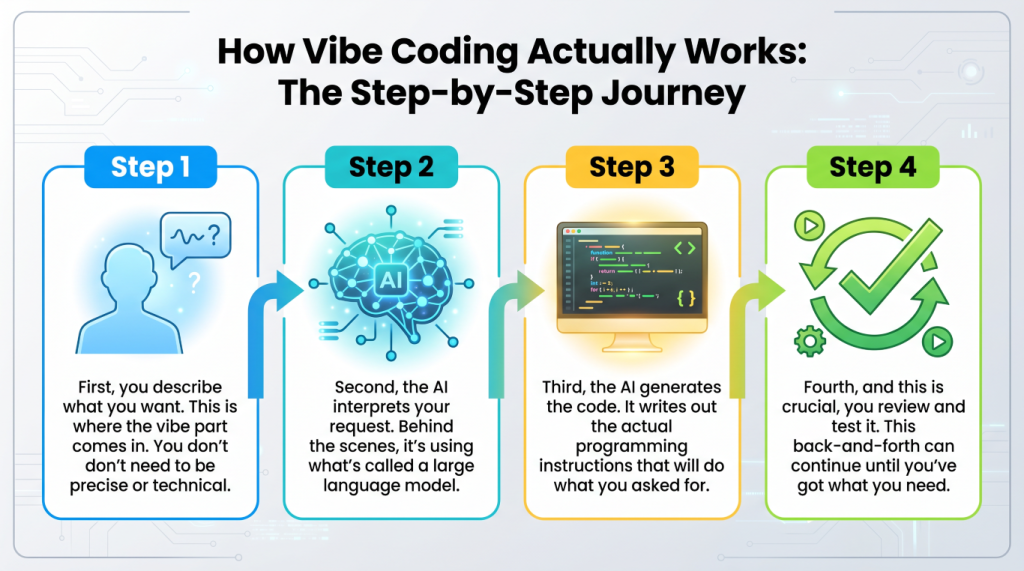
Right, let me walk you through what actually happens when you’re vibe coding, because it’s less mysterious than it sounds.
First, you describe what you want. This is where the “vibe” part comes in. You don’t need to be precise or technical. You might say something like “I want a button that when clicked shows a message saying hello.” That’s it. That’s your input.
Second, the AI interprets your request. Behind the scenes, it’s using what’s called a large language model, basically a very sophisticated AI that’s been trained on millions of examples of code and natural language descriptions. It’s seen so many patterns that it can usually figure out what you mean, even if you’re being a bit vague. It’s a bit like how you can understand what your grandchild wants even when they’re not explaining it perfectly, you’ve got context and experience.
Third, the AI generates the code. It writes out the actual programming instructions that will do what you asked for. This happens in seconds, which still amazes me every time. What might have taken a beginner hours of googling and trial and error just appears.
Fourth, and this is crucial, you review and test it. The AI shows you the code and usually some explanation of what it does. You run it, see if it works, and if it doesn’t quite do what you wanted, you tell the AI what’s wrong. “Actually, I wanted the message to be in blue text” or “Can it say hello with my name?” The AI then adjusts the code.
This back-and-forth can continue until you’ve got what you need. It’s genuinely conversational, which is why it feels so different from traditional programming. You’re collaborating rather than commanding.
What’s Coming Next: The Future of Vibe Coding
I think we’re still in the early days of this, which is both exciting and slightly terrifying. The trajectory seems to be heading towards AI coding tools that can handle increasingly complex projects with less and less specific instruction. We’re already seeing AIs that can build entire applications from a simple description, but they still need human oversight and often human fixing.
Where I think we’re heading, probably in the next few years, is towards AI that can maintain and update software over time, not just create it initially. Imagine telling your AI assistant “the login page is too slow, can you speed it up?” and it actually goes through your code, finds the bottleneck, and fixes it. We’re getting close to that.
There’s also a fascinating possibility that we might stop thinking about “coding” as a separate skill entirely. It might just become part of general computer literacy, like how using a word processor used to be a specialized skill but now it’s just something most people can do. Your ability to clearly describe what you want might become more important than your ability to write syntax.
But here’s what I don’t think will happen: I don’t think human programmers are going away. Complex software still needs human judgment, creativity, and understanding of real-world context. What I think will happen is that programmers will work at a higher level, focusing on architecture and design while AI handles more of the routine coding. And people who aren’t professional programmers will be able to do things that previously required one.
The Serious Bit: Security and Why You Need to Pay Attention
Now, I need to put on my serious hat for a moment because this matters. Vibe coding and AI-generated code come with some genuine security concerns, and you need to be aware of them.
First problem: AI doesn’t always write secure code. It writes code that works, but it might leave vulnerabilities, little holes that hackers could exploit. It’s a bit like building a house where all the rooms are lovely but you’ve accidentally left a window unlocked. The AI isn’t trying to be careless, it’s just that security requires specific knowledge and constant vigilance, and AI models are only as good as what they’ve learned from.
Second problem: you might not know enough to spot the vulnerabilities. If you’re using vibe coding precisely because you don’t know how to code, how are you supposed to know if the code you’ve generated is secure? This is a real catch-22. It’s like being given a car engine you can’t examine yourself, you’re trusting it works properly.
Third problem: AI can sometimes include code from its training data that it shouldn’t. There have been cases where AI coding tools generated code that was very similar to copyrighted code or code with known security flaws. It’s not being malicious, it’s just pattern-matching, but the result can be problematic.
So what do you do about this? A few things. If you’re building anything that handles sensitive information, passwords, financial data, personal details, you really should have someone with security knowledge review the code. I know that somewhat defeats the purpose of vibe coding’s accessibility, but some things are worth doing properly.
Also, use the AI’s explanations. Most AI coding tools will explain what the code does. Read those explanations. If something sounds odd or you don’t understand it, ask follow-up questions. The AI can usually clarify, and that process of questioning often reveals issues.
Finally, start small. Don’t begin your vibe coding journey by building something critical. Build little tools, experiment, learn what the AI is good at and where it struggles. It’s like learning to drive, you don’t start on the motorway.
Wrapping This Up: Where We Stand
So here we are, living through what I genuinely believe is a fundamental shift in how humans interact with computers. Vibe coding isn’t perfect, it’s not going to solve every problem, and it comes with legitimate concerns we need to address. But it’s opening doors that were previously locked for millions of people.
What is vibe coding at its heart? It’s the idea that you shouldn’t need to speak the computer’s language, the computer should learn to speak yours. It’s the notion that creating software should be about having good ideas and clearly communicating them, not about memorizing syntax and debugging semicolons.
I find myself genuinely excited about what this means for creativity and problem-solving. How many brilliant ideas have never happened because the person who had them couldn’t code? How many small businesses could benefit from custom software but couldn’t afford a developer? How many repetitive tasks could be automated if the person doing them could just describe what they needed?
The technology is here now, in 2026, and it’s only getting better. Yes, you need to be careful. Yes, you need to understand its limitations. Yes, professional programmers are still essential for complex, critical systems. But for a huge range of everyday tasks and projects, vibe coding is making the impossible possible.
And that, to me, is worth getting excited about. Even if the name still makes me chuckle a bit.
Walter
Leave a Reply