

Your Pocket Computer Is Smarter Than You Think
Let me tell you something. That rectangle you carry around in your pocket, the one you mostly use to check the weather and argue with strangers on Facebook, is one of the most sophisticated pieces of technology ever created by human hands. And you’re using about 3% of what it can do. Maybe 4% if you’ve figured out how to use the torch.
I’m not saying that to make you feel bad. I’m saying it because the hidden phone features buried inside your device are genuinely remarkable, and most people, regardless of age or technical background, have absolutely no idea they exist. These secret smartphone tricks aren’t hidden because manufacturers are being sneaky. They’re hidden because there are simply so many of them that nobody bothered to write the manual. And honestly, who reads manuals anyway?
So grab a cup of tea, get comfortable, and let me walk you through ten things your phone does that will probably make your jaw drop a little. Because understanding your phone isn’t just useful. It’s genuinely fascinating.
Why Your Phone Is the Most Important Device You’ll Ever Own
Think about what you carried around in 1995. A wallet, a watch, a diary, maybe a camera if you were going somewhere special. A map you’d folded incorrectly and could never quite get back into shape. A phone that was bolted to your kitchen wall. Now think about the fact that your smartphone replaces every single one of those things, plus a torch, a compass, a weather station, a library, a television, a radio, a doctor’s waiting room, a bank, and a rather impatient assistant who actually knows where everything is.
The smartphone is important not just because it’s convenient, but because it has fundamentally changed how we navigate life. From booking a GP appointment to video calling grandchildren who live in Australia, from translating a foreign menu to finding out whether that mushroom in the garden will kill you, the things your phone can do are almost limitless. And that’s precisely why understanding it matters. When something is this central to your daily life, knowing how it actually works, and knowing what it’s quietly doing in the background, gives you real power over your own experience.
Before the Smartphone, There Was… Well, a Lot of Faff
Let’s take a quick trip down memory lane, because context matters.
Before smartphones, we had mobile phones. Proper ones. The Nokia 3310, which was less a phone and more a small brick that could survive a nuclear blast. You could make calls, send texts (which required pressing the number 7 four times just to get the letter S), and play Snake. That was it. Glorious, simple Snake.
Before that, in the 1980s, mobile phones were the size of a small child and cost the equivalent of a second mortgage. They were called “car phones” because that’s where they lived, bolted into the centre console like a very expensive paperweight.
And before that? You had a phone on the wall, a phone on your desk, and if you were feeling particularly adventurous, a phone on the bedside table. If someone called while you were out, they simply didn’t reach you. The world somehow continued to turn.
The first true smartphone, in the modern sense, arrived with Apple’s iPhone in 2007. Before that, devices like the BlackBerry and early Nokia “smart” phones existed, but they were more like very ambitious calculators than the pocket computers we carry today.
From Brick to Brilliance: A Brief History of the Smartphone
2007, The iPhone Arrives. Steve Jobs stood on a stage and announced a device that was “an iPod, a phone, and an internet communicator” all in one. The audience laughed, thinking he was joking. He wasn’t. The first iPhone had a 3.5-inch screen, no App Store, and no copy-and-paste function. But it had a touchscreen that actually worked, which was revolutionary.
2008, Android Enters the Chat. Google launched Android, meaning the smartphone revolution wasn’t just for Apple customers. The first Android phone, the HTC Dream (called the T-Mobile G1 in the US), looked a bit like a calculator that had aspirations. But it worked, and it was affordable.
2010, The App Explosion. By 2010, the App Store had over 250,000 apps available. Suddenly your phone could do things nobody had planned for. It could be a spirit level. A guitar tuner. A recipe book. The phone had become a platform, not just a device.
2012 to 2016, Cameras Get Serious. This era saw phone cameras go from “acceptable in good lighting” to “genuinely threatening professional photographers.” Portrait mode, optical zoom, and front-facing cameras for selfies (a word that would have baffled everyone in 2005) became standard.
2017 to 2020, AI Moves In. Artificial intelligence quietly embedded itself into every aspect of the smartphone experience. Your phone started recognising faces, predicting what you’d type next, and understanding your voice commands with eerie accuracy.
2021 to Present, The Refinement Era. Today’s smartphones, including the iPhone 16 series and Samsung Galaxy S25 range, are less about dramatic new features and more about extraordinary refinement. Satellite connectivity, real-time AI processing, health monitoring, and camera systems that rival professional equipment.
10 Hidden Phone Features You Probably Don’t Know About
Right, here’s the good bit. Let’s get into the actual secret smartphone tricks that are sitting on your phone right now, waiting patiently for you to discover them.
Note: One thing worth saying upfront: phones are not one-size-fits-all. Some of these features will be sitting right there waiting for you. Others might not exist on your device yet, or might look slightly different depending on whether you’re on an iPhone or Android, and which version of the software you’ve got. Don’t panic if you can’t find something. It doesn’t mean your phone is broken. It might just be a bit behind on updates.
1. Your Phone Knows Where You’ve Been (Even When You Think It Doesn’t)
Your phone maintains something called a “Significant Locations” list, buried deep in your privacy settings. On an iPhone, it’s under Settings, Privacy, Location Services, System Services. It quietly logs everywhere you go regularly, your home, your GP surgery, your favourite café, and uses this to make suggestions and improve Maps accuracy. It’s not sinister, it’s genuinely useful, but it’s worth knowing it exists. You can turn it off if you’d rather it minded its own business.
2. It Can Measure Your Heart Rate and Stress Levels
Many modern smartphones, particularly Samsung devices, can measure your heart rate using the camera and flash. More impressively, Apple’s iPhone 15 and 16 series can detect irregular heart rhythms using the watch in conjunction with the phone. The phone uses the camera to detect tiny colour changes in your fingertip caused by blood flow. It’s essentially a medical device in your pocket, which is both wonderful and slightly alarming.
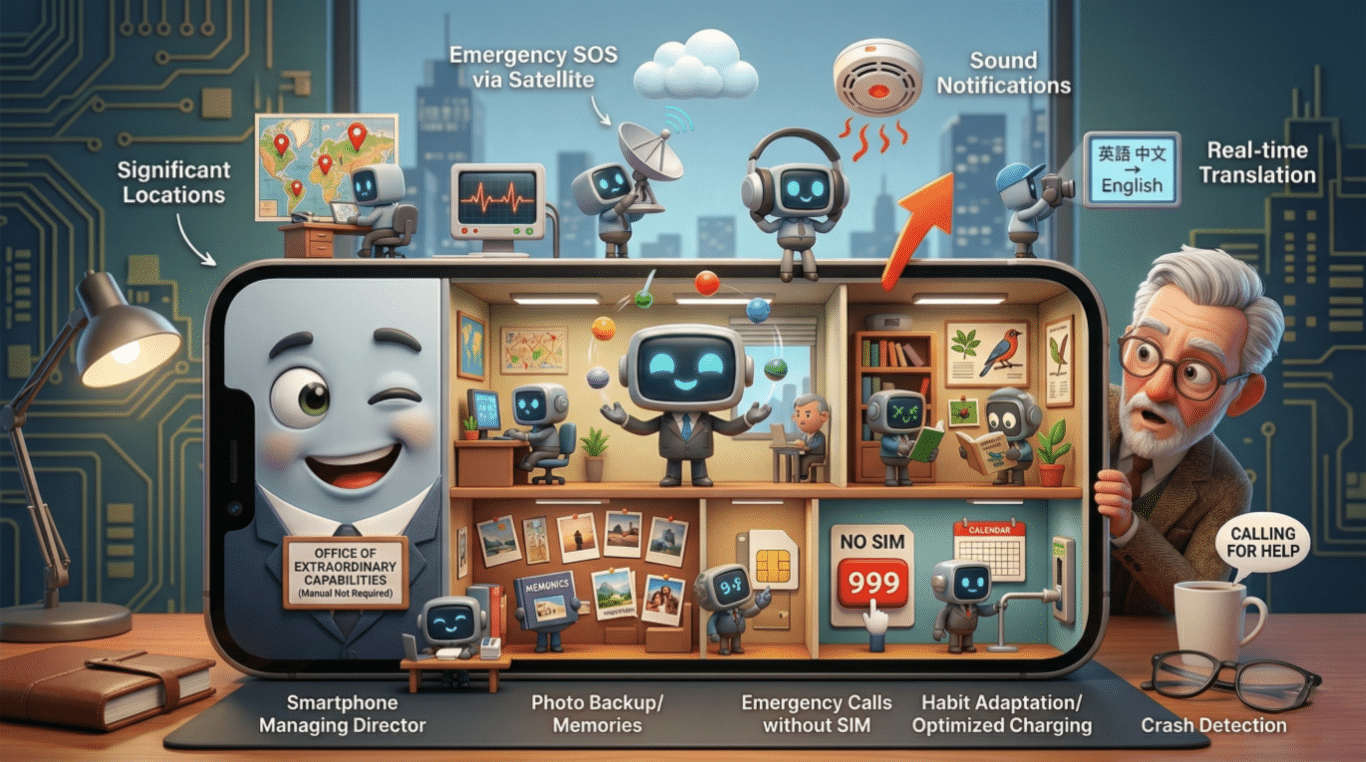
3. Emergency SOS via Satellite
Since the iPhone 14 and certain Android devices from 2023 onwards, your phone can send an emergency SOS message via satellite when there’s no mobile signal at all. In the middle of nowhere, no bars, no Wi-Fi, your phone can still reach emergency services. This is one of those things your phone can do that could genuinely save your life.
4. It’s Listening for Certain Sounds, Even When You’re Asleep
Android phones have a feature called “Sound Notifications” that uses the microphone to listen for specific sounds like smoke alarms, carbon monoxide detectors, doorbells, and baby crying, then alerts you via vibration or visual notification. It was designed for people with hearing difficulties, but it’s genuinely useful for anyone. iPhones have a similar feature called “Sound Recognition” in Accessibility settings.
5. Your Phone Can Translate in Real Time Through the Camera
Open Google Translate, point your camera at a foreign language sign, menu, or document, and watch as the text transforms into English before your eyes. In real time. Without taking a photo. It works on restaurant menus, road signs, instruction manuals, and that letter from the council that seems to be written in a language only solicitors understand.
6. It Can Identify Plants, Animals, and Songs
Point your camera at a plant and your phone will tell you what it is. Hear a bird singing and your phone will identify the species. Hear a song playing in a café and Shazam (or the built-in music recognition on both iPhone and Android) will name it within seconds. These are hidden phone features that turn your device into a naturalist’s field guide.
7. Your Phone Creates a Backup of Your Memories
Google Photos and Apple’s iCloud Photos don’t just store your pictures. They analyse them, recognise faces, locations, and events, and create automatic highlight reels, slideshows, and “On This Day” memories. They’re also quietly organising your photos by subject, so you can search “beach” or “birthday” or “that time the dog ate the sofa” and find relevant photos immediately.
8. It Can Run Without a SIM Card in an Emergency
Even if your phone has no SIM card, no active plan, and no network connection, it can still call 999 (or 112 in Europe). Emergency calls bypass the need for a network subscription. Your old phone, sitting in a drawer, could still save a life.
9. It Adjusts Its Behaviour Based on Your Habits
Modern smartphones use machine learning to study your daily patterns and optimise accordingly. If you always check your email at 7am, your phone pre-loads it. If you plug in to charge every night at 10pm, it learns to slow the final charging phase to protect battery health. It’s like having a very attentive personal assistant who never needs a day off.
10. It Can Detect a Car Crash and Call for Help Automatically
Since the iPhone 14 and Pixel 7, smartphones include crash detection using accelerometers and other sensors. If you’re in a serious collision, your phone detects the impact, checks if you’re okay, and if you don’t respond, automatically calls emergency services and shares your location. This is perhaps the most remarkable of all the secret smartphone tricks, and most people have absolutely no idea it’s there.
How Does Your Phone Actually Do All This? Let Me Explain
Think of your smartphone like a very small, very fast office building. Inside that building, there are dozens of departments all working simultaneously.
The processor is the managing director, making decisions incredibly fast, billions of calculations per second. The sensors are the receptionists, constantly gathering information from the outside world, movement, light, sound, temperature, location. The operating system is the office manager, making sure all the departments talk to each other properly and nobody goes rogue.
When you use a feature like crash detection, the accelerometer (the sensor that knows which way up your phone is and how fast it’s moving) sends data to the processor. The processor compares that data against patterns it’s been trained to recognise as a car crash. If it matches, it triggers a chain of events across multiple departments simultaneously, checking GPS, activating the microphone, preparing an emergency call, all within a fraction of a second. It’s extraordinary, genuinely extraordinary, and it all happens before you’ve even had time to think.
What the Future Holds
The next five years of smartphone development are going to be genuinely wild. AI assistants are moving from “helpful but occasionally baffling” to genuinely intelligent, capable of managing your entire diary, health, finances, and communications with minimal input from you.
Foldable phones, which currently feel like a novelty, are becoming more practical and affordable. Augmented reality, where digital information overlays the real world through your camera, is moving from science fiction to everyday use. And health monitoring is expanding rapidly, with future phones potentially able to monitor blood glucose levels without breaking the skin.
The things your phone can do in 2030 will make today’s features look like Snake on a Nokia.
Security and Vulnerabilities: This Bit Matters, So Please Read It
Here’s where I need to be straight with you, because this is genuinely important.
Your phone knows an enormous amount about you. Your location, your health, your financial details, your conversations, your photos, your habits. That makes it valuable, not just to you, but to people who’d like to get their hands on that information without your permission.
The most common vulnerabilities aren’t dramatic Hollywood hacking scenarios. They’re much more mundane. Clicking a link in a text message that looks like it’s from your bank. Connecting to a public Wi-Fi network in a café without using a VPN. Using the same password for everything. Not updating your phone’s software when it asks you to.
Those software updates that your phone nags you about? They’re not just adding new features. They’re patching security holes that have been discovered since the last update. Ignoring them is a bit like being told there’s a broken lock on your back door and deciding you’ll get around to fixing it eventually.
Use a strong PIN or biometric lock. Be suspicious of unexpected messages asking you to click links. Keep your software updated. And if something feels wrong, trust that instinct. It’s usually right.
In Summary: Your Phone Is Remarkable, and So Are You
We’ve covered a lot of ground today. From the Nokia brick to satellite emergency calls, from Snake to crash detection, from the kitchen wall phone to a device that monitors your heart and identifies birds. The journey has been extraordinary, and we’re nowhere near the end of it.
The hidden phone features we’ve talked about today aren’t gimmicks. They’re genuinely useful tools that can make your life safer, easier, and more interesting. And understanding them, even at a basic level, puts you in control of one of the most powerful devices ever created.
You don’t need to be a technology expert to get more out of your phone. You just need a little curiosity and someone to explain things without making you feel like you should already know them. That’s what I’m here for.
So go on. Have a poke around in your settings. Discover a few of these things your phone can do. Point your camera at a plant. Let your phone translate that confusing letter. Check whether crash detection is turned on.
Your phone has been quietly doing remarkable things for you all along. It’s about time you got properly acquainted.
Walter
Leave a Reply