

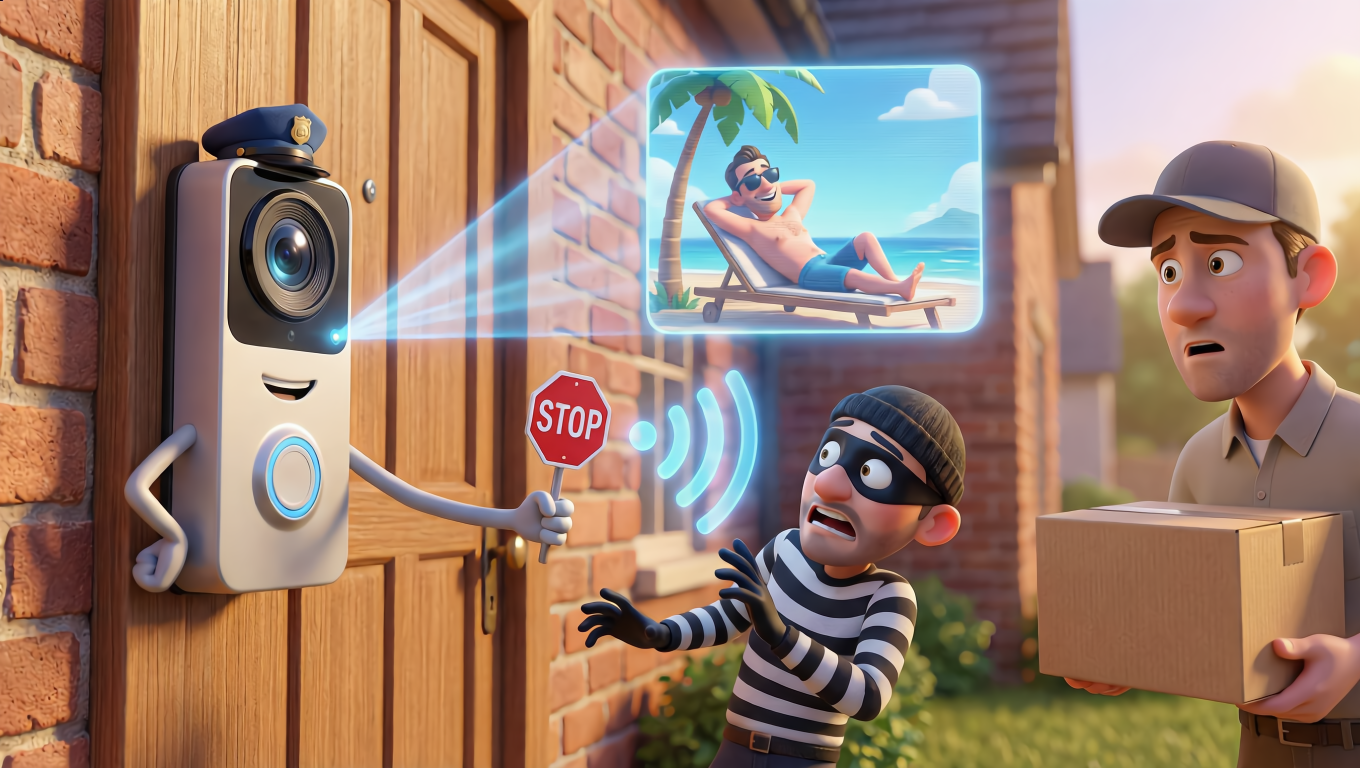
Let me tell you something that would have sounded absolutely bonkers twenty years ago. I now have a doorbell that lets me see who’s at my front door whilst I’m sitting on a beach in Spain. I can talk to the delivery driver, tell him to leave the parcel round the back, and he hasn’t got a clue I’m actually 1,500 miles away sipping a sangria. Welcome to the world of smart doorbells, where your front door became a security guard, a personal assistant, and unfortunately, sometimes a security headache all rolled into one.
Why Video Doorbell Security Matters More Than You Think
Here’s the thing about video doorbell security that keeps me up at night occasionally. These little devices aren’t just fancy bells anymore. They’re cameras. They’re microphones. They’re connected to your home Wi-Fi network, which is connected to, well, everything else in your house. Your laptop. Your phone. Your smart TV. Your whole digital life, really.
Think of your home network like a house with many rooms. Your smart doorbell is the front door to that house. Now, if someone figures out how to unlock that front door, they’re not just peeking at who’s delivering your Amazon parcels. They could potentially wander into other rooms. That’s why smart doorbell hacking has become such a hot topic in security circles, and why I’m writing this piece for you today.
I’m not trying to scare you off these devices. I’ve got one myself, and I genuinely love it. But I want you to understand what you’re dealing with, because knowledge is power, and in this case, knowledge is also security.
What These Clever Little Devices Actually Do (And Don’t Do)
A smart video doorbell does a few brilliant things. It watches your front door 24/7, recording when it detects motion or when someone presses the button. It sends alerts to your phone so you know instantly when something’s happening. It lets you see and speak to whoever’s there through your smartphone, whether you’re upstairs in the bath or halfway across the world. Some models even let you see what happened hours or days ago, keeping a video history of all your visitors.
What it doesn’t do is think for itself or make decisions about security. It won’t call the police if it sees something dodgy (though some services offer professional monitoring for an extra fee). It won’t physically stop anyone from doing anything. It’s not a lock, not a security guard, not a force field. It’s eyes and ears, essentially, connected to your pocket.
Here’s what else it doesn’t do, and this surprised me when I first learned it. Most video doorbells don’t actually connect to your existing doorbell chime in a sophisticated way. They’re essentially replacing your old doorbell entirely, not upgrading it. Some people get confused about this and think they’re adding smart features to their existing bell. Nope. You’re swapping the whole thing out.
The Days Before Smart Doorbells: A Trip Down Memory Lane
Remember when doorbells were just, well, bells? I certainly do. My grandmother had one of those twist-key affairs that made a proper ringing sound, very Victorian. Before that, people literally had door knockers, chunks of metal you’d bang against the door. Imagine that being your only option in 2024.
Then we got peepholes, those little fisheye lenses in doors that made everyone look like they had massive noses. Better than nothing, but you still had to be home and physically walk to the door to see who was there. And if you were upstairs or in the garden, tough luck.
In the 1990s and early 2000s, some fancy houses started getting wired CCTV systems with cameras pointing at the front door. These were expensive, complicated to install, and required professional setup. You needed a dedicated monitor somewhere in the house to see the footage. They were clunky, but they worked. They just weren’t for regular folks like you and me.
The Evolution of Smart Doorbells: From Clunky to Clever
The first proper smart doorbell that regular people could actually buy came from a company called Doorbot in 2013. You might not recognize that name, but you’ll definitely know what it became: Ring. The founder, Jamie Siminoff, actually got rejected on the TV show Shark Tank, which must have stung a bit. Amazon bought Ring for over a billion dollars in 2018, so I imagine he’s not losing sleep over that rejection anymore.
That first Ring doorbell was pretty basic by today’s standards. It had a camera, a microphone, a speaker, and it connected to your Wi-Fi. When someone pressed the button, your phone would ring (hence the name, clever that). You could see who was there and talk to them. Revolutionary? Absolutely. Perfect? Not even close.
The video quality was grainy, about what you’d expect from a budget smartphone camera of that era. The connection was often dodgy. The battery life was disappointing. But here’s the thing, it worked well enough to prove the concept. People wanted this. They wanted to see their front door from anywhere.
The second generation, which started appearing around 2015-2016, improved the video quality significantly. We’re talking proper HD now, not that fuzzy nonsense. The motion detection got smarter, so you weren’t getting alerts every time a leaf blew past. Battery life improved. Other companies jumped in too. Google launched Nest Hello. Arlo got in the game. Competition breeds innovation, as they say.
By 2018-2019, we entered what I’d call the “actually quite good” era. Video doorbells now had features like night vision using infrared LEDs (so you could see who’s lurking about at 2am), two-way audio that didn’t sound like you were talking through a tin can, and smart detection that could tell the difference between a person, a car, and a cat. Some models added pre-roll recording, capturing a few seconds before the motion was detected, so you could see how someone approached your door.
The current generation, from 2020 onwards, is genuinely impressive. We’ve got 2K or even 4K video on some models. Colour night vision on premium versions. AI-powered detection that can recognize faces you’ve tagged as familiar. Integration with smart home systems so your doorbell can trigger lights or unlock smart locks. Some even have radar or advanced sensors to detect packages being delivered or removed.
How These Magical Devices Actually Work: The Technical Stuff Made Simple
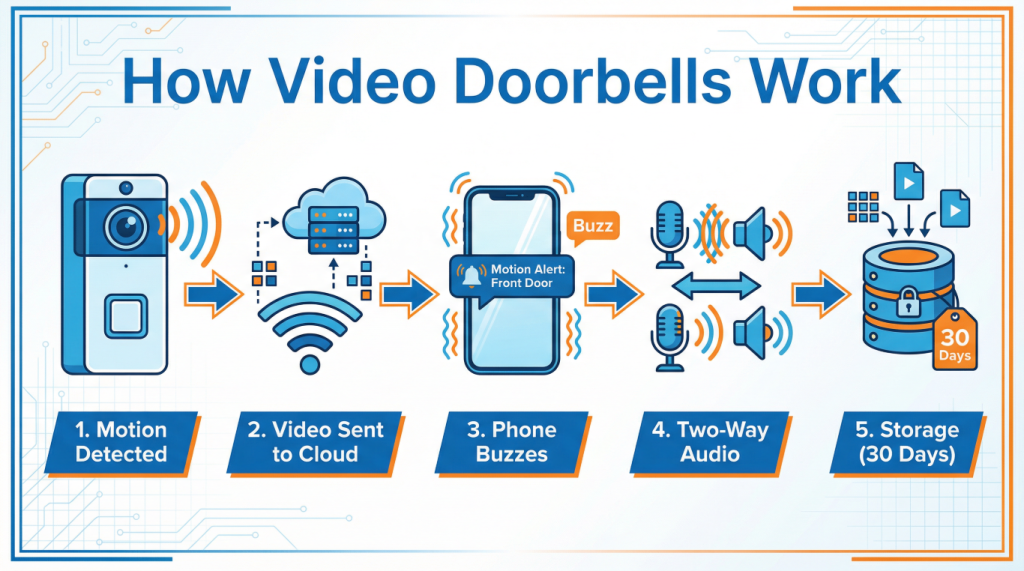
Right, let me walk you through what happens when someone approaches your front door, step by step, without making your eyes glaze over.
First, your video doorbell is constantly watching, like a very patient guard dog. It’s not recording everything all the time (that would eat through storage and battery faster than you can say “surveillance state”), but it’s monitoring for changes. It’s looking for motion.
When something moves in front of the camera, sensors detect it. Different doorbells use different sensors. Some use passive infrared, which detects heat changes (like a warm human body moving past). Others use pixel-based motion detection, where the camera notices when the image changes significantly. The fancier ones use both, plus radar or other clever tech.
Once motion is detected, several things happen almost simultaneously. The camera starts recording video. The doorbell connects to your home Wi-Fi router, which is connected to the internet. It sends the video footage up to the cloud, which is just a fancy term for “someone else’s computers in a data centre somewhere.” At the same time, it sends a notification to your phone through the doorbell company’s app.
Your phone buzzes. You open the app. The app pulls the video stream from the cloud and displays it on your screen. This whole process happens in a few seconds, though there’s usually a slight delay, anywhere from one to five seconds depending on your internet speed and the service quality.
If you tap the microphone button in the app, your voice gets sent back through the same route in reverse. Your phone, to the internet, to the cloud, to your doorbell, and out through the speaker. The person at your door hears you, probably wonders briefly if you’re actually home or using the remote feature, then has a conversation with your front door. It’s wonderfully bizarre when you think about it.
The video gets stored in the cloud for a certain period, usually 30 to 60 days depending on your subscription plan. You can review it later, download clips, or share them if needed. Some doorbells also store video locally on a memory card as a backup, which is handy if your internet goes down.
The Future: Where Smart Doorbells Are Heading
I reckon we’re going to see some fascinating developments in the next few years. The technology isn’t standing still, not for a moment.
Facial recognition is getting better and more common, though it’s controversial for privacy reasons. Your doorbell might soon reliably recognize your family members, regular visitors, and delivery drivers, giving you different notifications for each. “Your daughter’s home” versus “Unknown person at door” versus “Amazon delivery.”
Integration with other smart home devices will become seamless. Imagine this: your doorbell recognizes it’s you arriving home, automatically unlocks your smart lock, turns on the hallway lights, and adjusts your thermostat. All before you’ve even touched the door handle. That’s not science fiction anymore, it’s just expensive and slightly complicated to set up. Give it a few years, and it’ll be standard.
We’ll probably see better AI that can detect suspicious behaviour, not just motion. Loitering, package theft in progress, someone trying to tamper with the camera. The doorbell could send you an urgent alert that’s different from the regular “motion detected” ping you’ve learned to ignore.
Battery technology will improve, or more doorbells will use solar charging panels, meaning you’ll rarely need to take them down to recharge. The current situation where you need to unscrew your doorbell every few months to charge it is a bit annoying, frankly.
Security Vulnerabilities You Need to Know About
Now we get to the uncomfortable bit, the part that makes security experts twitchy. Smart doorbells, like any internet-connected device, can be vulnerable to hacking. And yes, Ring doorbell hacked incidents have made headlines, along with other brands.
Let me be clear about something first. The vast majority of smart doorbell security breaches aren’t because someone’s a genius hacker who broke through military-grade encryption whilst eating their cornflakes. Most happen because of weak passwords, reused passwords, or no two-factor authentication. It’s like leaving your front door key under the doormat and being shocked when someone finds it.
There have been documented cases where people’s Ring doorbells were accessed by unauthorized individuals who then harassed them through the speaker. Horrible stuff, truly disturbing. In most of these cases, the problem was credential stuffing, where hackers used usernames and passwords stolen from other websites to try logging into Ring accounts. If you used the same password for Ring as you did for that random shopping website that got hacked three years ago, bingo, they’re in.
Some vulnerabilities have been technical. In 2019, security researchers found flaws in certain doorbell models that could potentially allow hackers to intercept Wi-Fi passwords. The manufacturers patched these quickly, but it highlighted that these devices aren’t invulnerable.
There’s also the issue of unauthorized access to video footage. Some police departments have partnerships with Ring where they can request footage from users in specific areas. This isn’t hacking, it’s a feature, but it makes some people uncomfortable. You should know it exists.
Here’s what you absolutely must do to protect yourself, and I’m not being dramatic when I say this is essential:
Use a strong, unique password for your doorbell account. Not “password123” or your dog’s name. A proper password with letters, numbers, and symbols that you don’t use anywhere else. Write it down in a notebook if you must, just don’t reuse it.
Enable two-factor authentication. This means even if someone gets your password, they still need a code from your phone to log in. It’s a bit of a faff, but it’s the single most effective security measure you can take.
Keep your doorbell’s firmware updated. The companies release security patches regularly. Let them install automatically if possible. This is like getting your flu jab, it protects against the latest threats.
Secure your home Wi-Fi network with a strong password too. Your doorbell is only as secure as the network it’s connected to. If someone can access your Wi-Fi, they can potentially access any device on it.
Consider creating a separate guest network for your smart home devices. Many modern routers let you do this. It’s like having a separate entrance for delivery drivers instead of letting them through your main front door.
Review who has access to your account. If you shared access with someone who’s moved out or you’ve fallen out with, revoke their access. This seems obvious, but people forget.
Why You Should Care (But Not Panic)
Look, I don’t want to put you off getting a video doorbell. They’re genuinely useful devices that add convenience and security to your home. I love mine. But I want you to go into this with your eyes open.
The benefits are real. You can see who’s at your door from anywhere. You have a record of everyone who’s approached your property. You can speak to delivery drivers, tell cold-callers to sling their hook, or check on elderly relatives who live alone. These are valuable things.
The risks are also real, but they’re manageable with basic security hygiene. It’s like having a car. Yes, cars can be stolen or broken into, but you don’t avoid buying one because of that. You just lock it, park it sensibly, and take reasonable precautions.
The key word there is reasonable. You don’t need to become a cybersecurity expert. You just need to follow some basic rules that, frankly, you should be following for all your online accounts anyway.
The Bottom Line on Smart Doorbell Security
Video doorbells have evolved from a clever idea that got rejected on Shark Tank to a mainstream home security device that millions of people now rely on. They’ve gone from grainy, unreliable gadgets to sophisticated AI-powered cameras that can tell your mum apart from the postman.
They work by detecting motion, recording video, sending it to the cloud, and alerting your phone, all in a matter of seconds. It’s a minor miracle of modern technology that we’ve somehow started taking for granted.
The future looks bright, with better AI, seamless smart home integration, and improved reliability on the horizon. These devices will only get cleverer and more useful.
But, and this is important, smart doorbell hacking is a real concern that you need to take seriously. Not panic-inducing, curl-up-in-a-ball-and-hide-from-technology seriously. Just sensibly seriously. Strong passwords, two-factor authentication, regular updates. That’s your shield.
Ring doorbell hacked headlines grab attention because they’re scary, and they should serve as a wake-up call about video doorbell security, not a reason to avoid the technology entirely. Learn from other people’s mistakes. Protect your accounts. Be smart about your smart doorbell.
I genuinely believe these devices make our homes safer and our lives more convenient. I just want you to use them wisely, with a clear understanding of both their capabilities and their limitations. Your front door got smarter. Make sure your security habits did too.
Now, if you’ll excuse me, I need to go answer my doorbell. From my sofa. Because I can. And it’s marvellous.
Walter
Leave a Reply