

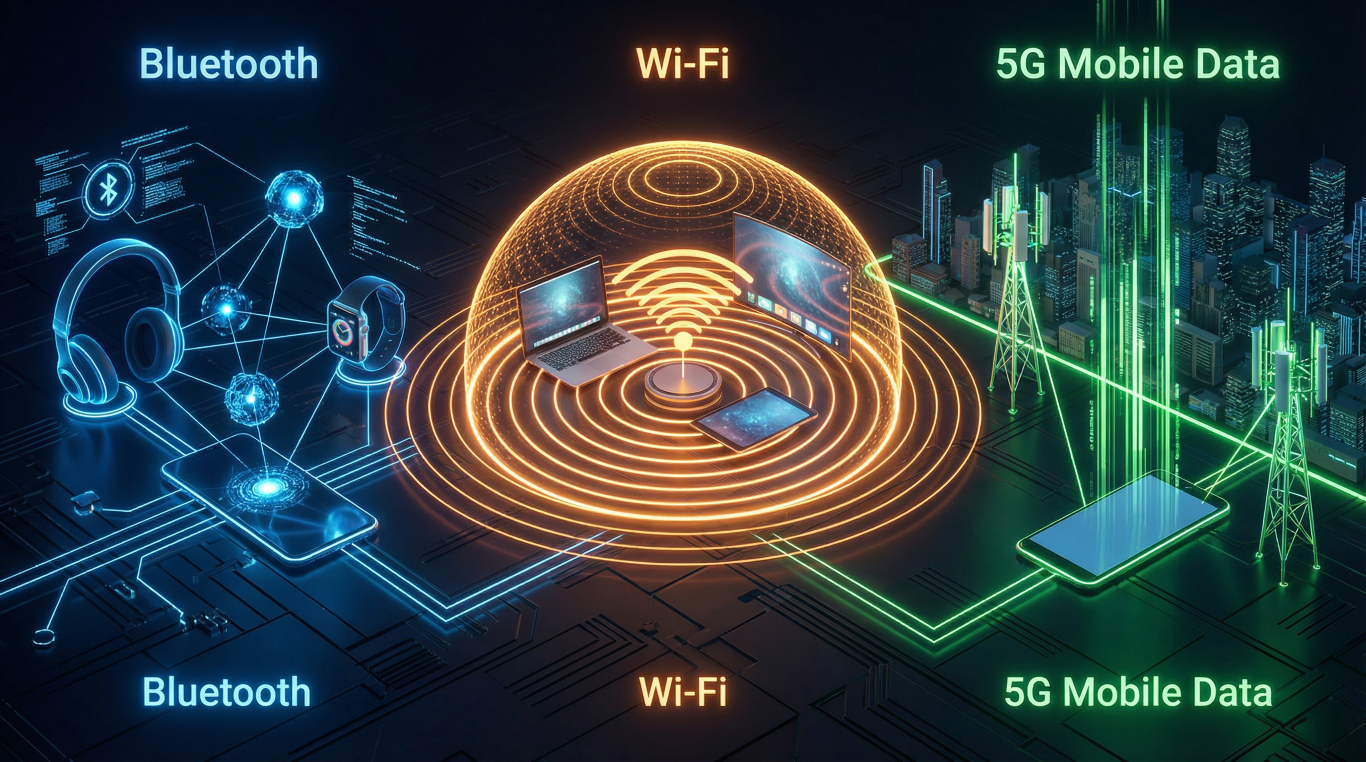
Remember when connecting to the internet meant sitting at a desk with wires trailing everywhere like some sort of technological spaghetti junction? And don’t get me started on those horrible screeching modem sounds. Thank goodness those days are behind us. Today, we’re living in a world where everything connects wirelessly, and honestly, it’s rather brilliant once you understand what’s going on.
The thing is, there are three main ways your devices talk to the internet and to each other: Bluetooth, Wi-Fi, and mobile data (including that 5G everyone keeps banging on about). They all do similar jobs, but in very different ways. It’s a bit like having three different types of transport to get around, you wouldn’t take a bicycle on the motorway, would you? Each one has its place, and knowing which to use when can save you frustration, money, and probably a fair bit of hair pulling.
I’m going to walk you through these three technologies in plain English, no jargon, no confusing acronyms (well, I’ll try), and definitely no talking down to you. Because here’s the thing, this stuff isn’t actually that complicated once someone explains it properly. So grab a cuppa, get comfortable, and let’s demystify the wireless world together.
Bluetooth: Your Devices’ Short-Distance Conversation
Let’s start with Bluetooth, which has nothing whatsoever to do with dental hygiene, despite the name. It’s actually named after a Viking king called Harald Bluetooth, who united Denmark and Norway. The technology does something similar, it connects your devices together over short distances.
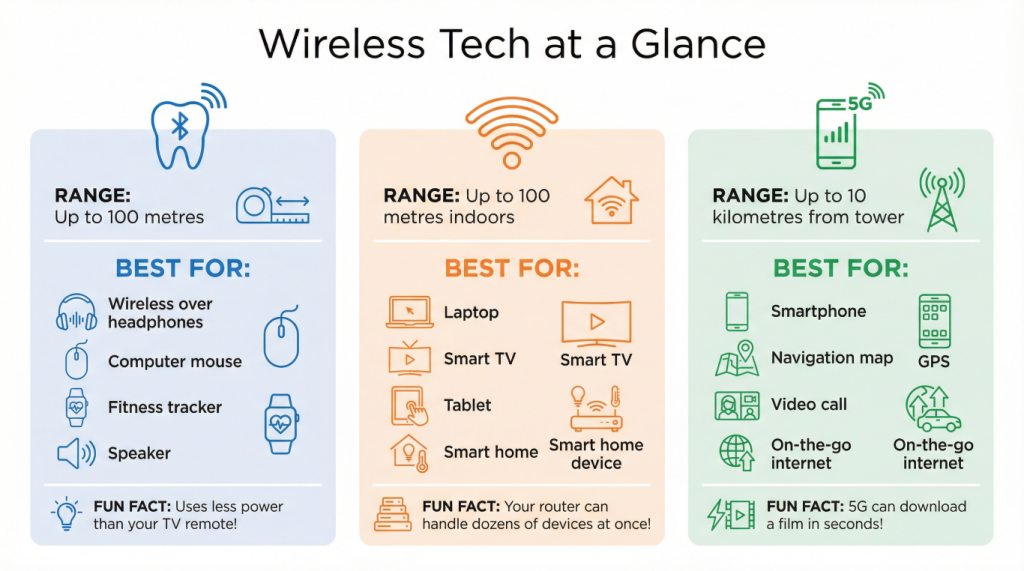
Think of Bluetooth as a private chat between two friends standing close together. It creates a little bubble of connection between your devices, usually within about 10 metres, though newer versions can stretch further. Your wireless headphones connect to your phone via Bluetooth. Your fitness tracker shares your step count through Bluetooth. That wireless keyboard you’re using? Bluetooth again.
The beauty of Bluetooth is that it doesn’t need the internet to work. It’s just a direct connection between devices. Your phone and your wireless speaker are having their own private conversation, nobody else needs to be involved. It’s like passing notes in class, remember that? Quick, personal, and only works with people sitting nearby.
What Bluetooth Does Best
Bluetooth absolutely shines when you want to connect accessories to your phone, tablet, or computer. Wireless headphones are probably the most common use these days. I don’t know about you, but I spent years getting my wired headphones tangled in everything, door handles, coat zippers, my own elbows. Bluetooth solved that particular annoyance beautifully.
It’s also perfect for wireless speakers, computer mice, keyboards, fitness trackers, smartwatches, and even some medical devices like blood pressure monitors. Basically, if it’s a gadget that needs to talk to your phone or computer but doesn’t need the internet directly, Bluetooth is your answer.
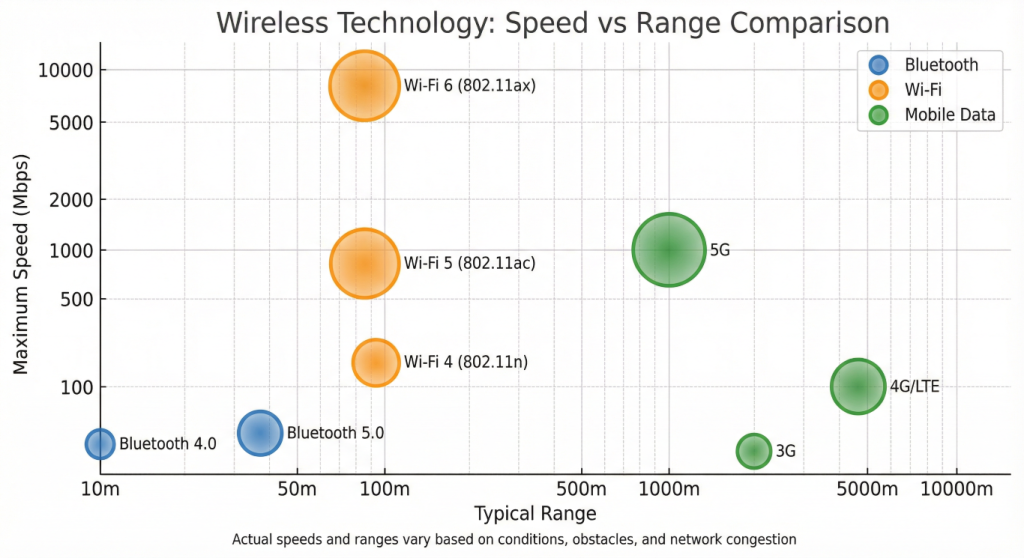
The newer versions, Bluetooth 4.0 and 5.0, are faster and can reach further than older versions. Bluetooth 5.0 can work up to 100 metres away in ideal conditions (though walls and obstacles will reduce that). But here’s the thing, for most everyday uses, you won’t really notice the difference between versions. Your headphones work just fine with any recent version.
Bluetooth’s Limitations
Now, Bluetooth isn’t perfect. It’s not designed for sending large files or streaming high-quality video. It’s a short-range technology with relatively modest speeds, we’re talking 2 to 50 megabits per second depending on the version. That’s plenty for music or fitness data, but you wouldn’t want to download a film over Bluetooth. It would take forever, and you’d have to stay within arm’s reach of your device the whole time. Not ideal.
Also, Bluetooth can only connect a limited number of devices at once. Most phones can handle about seven or eight simultaneous Bluetooth connections, but that’s pushing it. Try connecting too many things and they’ll start competing for attention like children at a birthday party.
To read our complete guide on Bluetooth Technology click here
Wi-Fi: Your Home’s Internet Highway
Right, now we’re onto Wi-Fi, which is probably the wireless technology you use most without thinking about it. Wi-Fi is what connects your devices to the internet when you’re at home, in a café, at the library, or anywhere else with a wireless router.
Here’s how I think about Wi-Fi: imagine your internet connection is like the water supply coming into your house. The router is like the plumbing system that distributes that water to different taps around your home. Except instead of water, it’s internet, and instead of pipes, it’s invisible radio waves. Your laptop, tablet, phone, and smart TV all tap into this wireless network to get online.
Wi-Fi creates a local network, usually covering your whole house and a bit of the garden if you’re lucky. The typical range is about 30 to 100 metres, depending on your router and how many walls are in the way. Thick walls and floors can really mess with Wi-Fi signals, which is why the connection might be brilliant in the living room but absolutely rubbish in the back bedroom.
What Wi-Fi Does Best
Wi-Fi is the workhorse of home internet connectivity. It’s what you use for browsing the web on your laptop, streaming Netflix on your telly, video calling the grandchildren, downloading photos, and basically anything that needs a decent internet connection while you’re at home.
The big advantage of Wi-Fi over mobile data is that it’s usually much faster and doesn’t eat into your mobile data allowance. Once you’ve paid for your home broadband, you can use as much Wi-Fi as you like without worrying about extra charges. This is why everyone tells you to use Wi-Fi whenever possible, it’s your unlimited buffet of internet access.
Modern Wi-Fi is also pretty speedy. The different versions (Wi-Fi 4, 5, 6, and the newest 6E) offer different speeds, ranging from about 150 megabits per second up to a whopping 10 gigabits per second for Wi-Fi 6. Now, you probably won’t see those maximum speeds in real life, there are always bottlenecks somewhere, but even a modest Wi-Fi connection is fast enough for streaming, video calls, and pretty much anything you’d want to do online.
Wi-Fi’s Limitations
The main limitation of Wi-Fi is range. Step too far from your router and the signal drops off, then you’re standing in the kitchen holding your tablet up in the air trying to find a connection, looking utterly ridiculous. Wi-Fi also doesn’t work outside your home network unless you’re in a public Wi-Fi area, so it’s not useful when you’re out and about.
Security is another consideration. Public Wi-Fi networks can be risky because other people are on the same network. It’s generally fine for casual browsing, but I wouldn’t do online banking on the café Wi-Fi if I could avoid it.
To read our complete guide on WIFI Technology click here
Mobile Data: Your Pocket-Sized Internet Connection
Now we come to mobile data, the technology that lets you access the internet on your phone when you’re away from Wi-Fi. This includes 3G, 4G, and the fancy new 5G that everyone’s excited about. Mobile data is provided by your phone network (EE, Vodafone, Three, O2, whichever you’re with) through a network of cell towers dotted around the country.
Think of mobile data like this: imagine there are invisible lighthouses scattered across the landscape, each one beaming out internet signals in all directions. Your phone picks up these signals wherever you are, as long as you’re within range of a tower. That’s how you can browse the web while sitting on a bus, check your email in the park, or look up directions when you’re lost in a strange town.
What Mobile Data Does Best
Mobile data is your lifeline when you’re away from Wi-Fi. It’s what lets you look up restaurant reviews while standing on the high street, check train times at the station, use navigation when driving, and stay in touch with people wherever you are.
The key advantage is portability. As long as you’re in coverage (and have data remaining in your plan), you can access the internet anywhere. It’s your safety net, your research tool, your entertainment system, and your communication device all rolled into one.
Mobile Data’s Limitations
The main drawback of mobile data is cost. Unlike Wi-Fi, which is unlimited once you’re paying for broadband, mobile data typically comes with monthly limits. Go over your allowance and you’ll either be charged extra or your speed will be throttled down to a crawl. This is why everyone’s always telling you to connect to Wi-Fi when you can, it saves your precious data allowance.
Coverage can also be an issue. Despite what the adverts claim, no network covers absolutely everywhere. You’ll still find dead spots, particularly in rural areas, underground, or in buildings with thick walls. It’s improved enormously over the years, but it’s not perfect.
Battery drain is another consideration. Using mobile data, especially 5G, consumes more battery power than Wi-Fi. If you’re out all day using 5G continuously, your phone battery will be crying for mercy by teatime.
To read our complete guide on Mobile Data Technology click here
Bringing It All Together: When to Use What
Here’s the practical bit. You’ve now got three different wireless technologies at your disposal, so when should you use each one?
Use Bluetooth when you want to connect wireless accessories to your phone or computer. Headphones, speakers, fitness trackers, wireless mice, that sort of thing. It’s perfect for personal devices that need to work together over short distances.
Use Wi-Fi whenever you’re at home or in a location with trusted wireless internet. It’s faster than mobile data, doesn’t count towards your mobile data allowance, and generally more stable for things like video streaming and downloading large files. Make Wi-Fi your default option when it’s available.
Use mobile data when you’re out and about without access to Wi-Fi. It’s brilliant for navigation, checking information on the go, staying in touch, and general mobile internet use. Just keep an eye on your data usage to avoid nasty surprises on your bill.
The clever thing is, these technologies work together beautifully. You might use mobile data to look up directions while you’re walking to a café, then switch to the café’s Wi-Fi to video call a friend, all while listening to music through your Bluetooth headphones. They complement each other, each playing to its strengths.
Comparison Table: Bluetooth vs Wi-Fi vs Mobile Data
| Feature | Bluetooth | Wi-Fi | Mobile Data (3G/4G/5G) |
| Typical Range | 10-100 metres | 30-100 metres | 1-10 kilometres |
| Maximum Speed | 2-50 Mbps | 150 Mbps – 10 Gbps | 2 Mbps – 1+ Gbps |
| Internet Access | No (device-to-device only) | Yes (via router) | Yes (via mobile network) |
| Best For | Wireless accessories, headphones, speakers, fitness devices | Home internet, streaming, downloads, multiple devices | Internet on the go, navigation, mobile browsing |
| Cost | Free (no ongoing charges) | Monthly broadband subscription | Monthly mobile plan with data limits |
| Coverage | Personal range only | Home/office network only | Nationwide (where towers exist) |
| Power Consumption | Very low | Low to moderate | Moderate to high (5G highest) |
| Number of Devices | Limited (typically 7-8) | Many (20-30+ depending on router) | One device per SIM card |
| Setup Complexity | Simple pairing process | Requires router, password | Automatic (if mobile plan active) |
| Security | Moderate (pairing required) | Good (if password protected) | Good (encrypted by network) |
The Visual Guide: Infographic and Chart
I’ve created two visual aids to help you see these differences at a glance. The first infographic shows the typical range, best uses, and a fun fact about each technology. It’s a quick reference guide you can come back to whenever you need a reminder.
The second chart plots speed against range for different versions of each technology. You’ll notice that Bluetooth sits in the corner with short range and modest speed, Wi-Fi offers high speed but still limited range, and mobile data trades some speed for much greater range. There’s no single “best” option, they each occupy their own niche.
Why Understanding This Matters
You might be wondering why you should care about all this technical stuff. Fair question. Here’s why it matters: understanding these three technologies helps you make better decisions about which devices to buy, which mobile plan you need, how to troubleshoot connection problems, and how to save money.
For instance, if you know that Wi-Fi doesn’t cost you extra data, you’ll remember to connect to it before downloading a large app update. If you understand that Bluetooth is for accessories, you won’t waste time trying to connect your wireless headphones to the internet directly. And if you know that 5G drains your battery faster, you might choose to stick with 4G when you need your phone to last all day.
It also helps you cut through the marketing nonsense. Sales people love to confuse customers with jargon because it makes expensive options seem more impressive. But when you understand that Wi-Fi 6 only matters if all your devices support it, or that 5G is pointless if there’s no coverage in your area, you can make informed choices instead of being pressured into upgrades you don’t need.
A Positive Look Forward
The wireless world we live in today would have seemed like science fiction not that long ago. The fact that we can carry pocket-sized devices that instantly connect us to the sum of human knowledge, let us talk face-to-face with people on the other side of the world, and provide us with turn-by-turn directions to anywhere, well, that’s actually quite remarkable when you stop to think about it.
Bluetooth, Wi-Fi, and mobile data are the invisible threads that weave our connected world together. They’re not competing technologies, they’re complementary ones. Each does what it does best, and together they give us unprecedented freedom and connectivity.
Yes, the technology can seem overwhelming sometimes. There are new versions, confusing terms, and occasional frustrations when things don’t work as they should. But take a step back and appreciate what’s actually happening. These technologies are enabling us to stay in touch with loved ones, access information instantly, work from anywhere, and maintain our independence as we get older.
The beauty of modern wireless technology is that it mostly just works. You don’t need to understand radio frequencies or data protocols any more than you need to understand internal combustion to drive a car. But having a basic grasp of what Bluetooth, Wi-Fi, and mobile data actually do helps you use them more effectively and with more confidence.
So next time you’re listening to your favourite music through wireless headphones (Bluetooth), while sitting in your living room checking the weather online (Wi-Fi), and your phone buzzes with a message from a friend who’s out shopping (mobile data), take a moment to appreciate the quiet miracle of wireless connectivity. It’s brought the world to our fingertips, and that’s something rather wonderful.
Now get out there and embrace your wireless devices with confidence. You understand how they work, you know which technology to use when, and you’re equipped to make the most of the connected world. And if anyone tries to baffle you with technical jargon, you can smile knowingly and explain it back to them in plain English. That’s rather satisfying, I can tell you.
Walter
Leave a Reply