

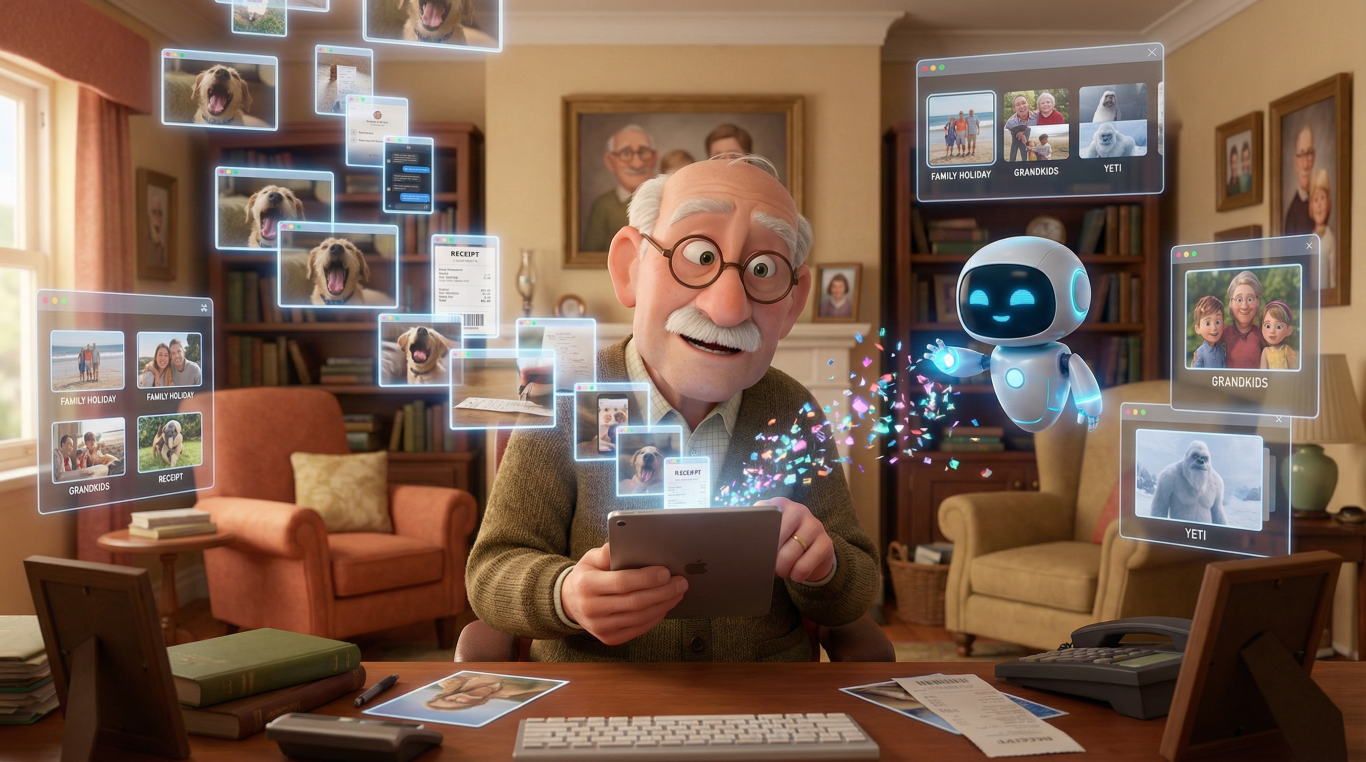
I’ve got 47,000 photos on my phone. Forty-seven thousand. I know this because I finally checked last week, and honestly, I felt a bit sick. There are 23 nearly identical shots of my dog yawning, 156 accidental screenshots, and what appears to be an entire folder dedicated to photos of receipts I’ll never look at again. If you’re nodding along right now, welcome to the club. We’re all drowning in digital memories, and it’s getting worse every year.
This is where AI photo organizer technology comes in, and I’m not being dramatic when I say it’s genuinely life-changing. We’re talking about artificial intelligence that can sort through your thousands of photos, find the duplicates, organize everything by faces and places, and basically do what you’ve been promising yourself you’d do “next weekend” for the past three years. It’s brilliant, it’s surprisingly clever, and once you understand how it works, you’ll wonder how you ever managed without it.
Why This Matters More Than You Think
Remember when we used to take photos sparingly? You had a 24-exposure film, you made every shot count, and you actually got them developed and put them in albums. Now? We take photos of everything. Our lunch. The parking space number. That funny sign we saw. The problem is, we never delete anything. We just keep accumulating.
The average person now takes over 20 photos a day. That’s over 7,000 photos a year. Multiply that by however many years you’ve had a smartphone, add in all those photos people share with you, and you’ve got a digital landfill site masquerading as a photo library.
An AI photo organizer isn’t just about tidiness, though that’s lovely. It’s about being able to actually find the photos that matter. It’s about not running out of storage space at your grandchild’s birthday party. It’s about rediscovering memories you’d completely forgotten because they were buried under 3,000 other images. And let’s be honest, it’s about not having to manually scroll through years of photos to find that one picture you need right now.
What It Does (And What It Doesn’t)
Let’s get clear on what we’re talking about here. An AI photo organizer does several rather magical things. It automatically sorts your photos by recognizing what’s in them. It can identify people’s faces and group all photos of the same person together. It recognizes locations, objects, even activities. It can spot duplicate photos and near-duplicates, those three nearly identical shots you took “just to be sure.” It can find blurry photos, screenshots, and other things you probably don’t need cluttering up your library.
The duplicate photo finder feature is particularly satisfying. You know those times when you took five versions of the same photo because someone blinked? The AI can spot these and help you keep the best one while suggesting you delete the rest. It’s like having a very patient friend who’s willing to do the tedious work you can’t face.
But here’s what it doesn’t do, and this is important. It doesn’t make decisions for you about what’s meaningful. It won’t automatically delete your photos without permission (well, the good ones won’t). It can’t understand that the slightly blurry photo of your late mother is precious, even if technically it’s not a “good” photo. It suggests, it organizes, it helps, but you’re still in control. Think of it as a very clever assistant, not a dictator.
It also doesn’t magically improve terrible photos into professional ones, though some AI systems do offer enhancement features. That’s a different technology, though they often work together. We’re focusing here on organization and cleanup, not photo editing.
The Old Days: How We Used to Manage Photos
Before AI came along to save us, managing digital photos was genuinely painful. I remember the early days of digital cameras in the late 1990s and early 2000s. You’d plug your camera into your computer with a cable (after finding the right cable, obviously), transfer the photos to a folder, and that was about it. If you were very organized, you might create folders by date or event. “Holiday_Spain_2003” and so on.
The really keen people used software like Adobe Photoshop Album or ACDSee. These programs let you add tags manually. You’d type in “beach” or “Sarah” or “Christmas,” and then theoretically you could search for these later. But here’s the thing, you had to do all of this yourself. Every single photo. Every single tag. It was mind-numbingly boring, and most of us just didn’t bother.
Apple’s iPhoto, launched in 2002, made things a bit easier. It automatically organized photos by date and let you create albums and slideshows. Windows had similar offerings. But it was all still manual. You were the one doing the organizing, the sorting, the deleting. The computer was just a filing cabinet, not a helper.
And duplicates? Forget it. You’d have to spot them yourself, visually, scrolling through hundreds of thumbnails. I once spent an entire Sunday afternoon deleting duplicate photos from a holiday. An entire Sunday. I’m still not over it.
The Evolution: From Dumb Sorting to Smart Recognition
The first real breakthrough came around 2015 when Google Photos launched with genuinely impressive AI capabilities. This was when things got interesting. Suddenly, you could search for “beach” and the AI would find all your beach photos, even though you’d never tagged them. You could search for “dog” and there were all your dog photos. It felt like magic because, in a way, it was.
This early version used something called image recognition. The AI had been trained on millions of photos to recognize common objects, scenes, and patterns. It’s a bit like how you learned to recognize a cat, you saw lots of cats, and eventually your brain went “ah yes, that’s definitely a cat.” The AI did the same thing, just with computer processing instead of a brain.
Apple joined the party properly in 2016 with improvements to their Photos app. They added facial recognition, which was genuinely clever. The app would scan through all your photos, identify faces, and then group them together. You’d just tell it once “that’s Uncle Bob,” and suddenly you had every photo of Uncle Bob in one place. The benefit over the previous version was enormous. Instead of searching through thousands of photos manually, you could find every photo of a specific person in seconds.
These systems also started getting better at understanding context. They could recognize not just “person” but “person at a wedding” or “person playing football.” They understood scenes, like sunsets, mountains, or city skylines. Each improvement made the photo library cleanup process less painful and more automatic.
Around 2018-2019, the technology evolved further with better duplicate detection. The AI could now spot not just identical duplicates but similar photos. Those five shots you took in quick succession? It could identify them as a burst and suggest you keep the sharpest one. This duplicate photo finder capability was a game-changer for anyone with thousands of photos.
The current generation, what we have now in 2024, is frankly remarkable. Modern AI photo organizers can understand incredibly nuanced things. They can identify specific breeds of dogs, types of food, even emotions in facial expressions. They can recognize your photos taken at the same location across different years. They understand relationships, grouping photos of people who appear together frequently. Some can even generate automatic summaries of events, like “Beach Holiday, July 2023” with the best photos already selected.
The benefit over earlier versions is that it’s more accurate, more automatic, and more helpful. You do less work, and get better results. It’s like comparing a basic calculator to a smartphone, they both do maths, but one is vastly more capable.
How It Actually Works: The Technical Bit Made Simple
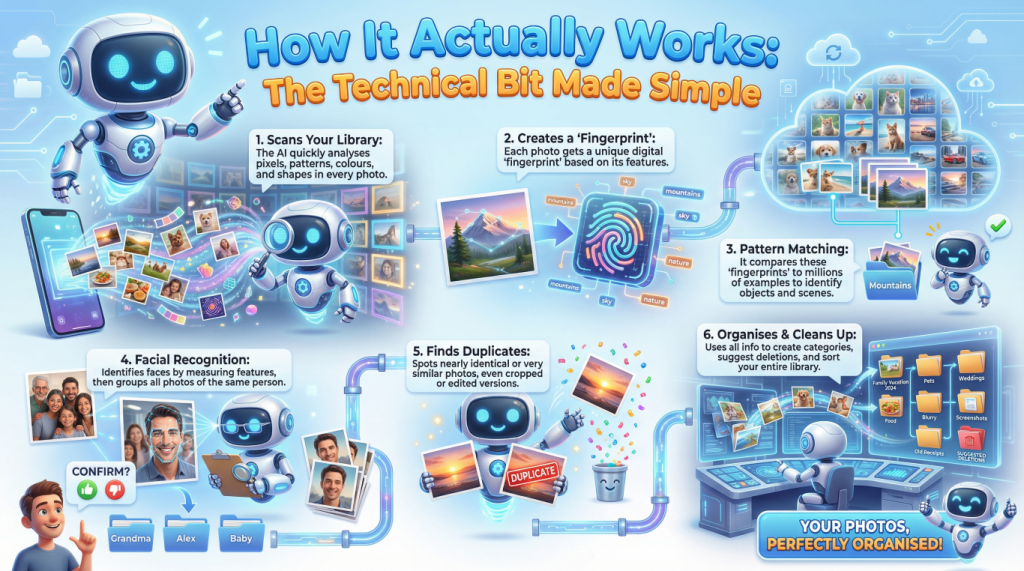
Right, let me explain how this AI photo organizer magic happens, step by step, without making your eyes glaze over.
First, the AI scans through your photo library. It’s not looking at the photos the way you do, appreciating the composition or the memories. It’s analyzing pixels, patterns, colors, and shapes. Imagine if you had to describe a photo to someone over the phone who couldn’t see it. You’d say “there’s a woman in a red dress, standing on a beach, with the sun setting behind her.” The AI does something similar, but in a more mathematical way.
For each photo, the AI creates what’s called a “feature map” or “embedding.” Think of this as a unique fingerprint for that photo. It notes things like “faces in these positions, sky in this area, predominantly blue and orange colors, likely outdoor scene, likely evening time.” This happens incredibly quickly, your phone or computer can process hundreds of photos per minute.
Next comes the clever bit, pattern matching. The AI compares these fingerprints against its training. It’s been shown millions of photos before, photos that humans have labeled. “This is a cat.” “This is a beach.” “This is a birthday cake.” So when it sees similar patterns in your photos, it can make educated guesses. Your photo has similar features to the million beach photos it’s seen before? Probably a beach.
For facial recognition, the process is similar but more specific. The AI identifies faces in photos, then measures the distances between features like eyes, nose, and mouth. These measurements create a unique pattern for each face. When it finds faces with very similar patterns across different photos, it groups them together. You then confirm “yes, that’s all Sarah,” and the AI remembers this for future photos.
The duplicate photo finder works by comparing these fingerprints between photos. If two photos have nearly identical fingerprints, they’re probably duplicates or very similar shots. The AI can even detect if one photo is a slightly cropped or edited version of another. It’s looking for patterns that are too similar to be coincidence.
For organizing and cleanup, the AI uses all this information to create categories, albums, and suggestions. It might notice you have 15 blurry photos and suggest reviewing them for deletion. It might spot that you’ve got 200 screenshots mixed in with your real photos and offer to separate them. It’s constantly analyzing and making helpful suggestions based on patterns it recognizes.
The important thing to understand is that all this happens automatically, usually in the background. You don’t have to do anything. The AI just gets on with it, quietly organizing your chaos while you’re doing other things. On modern smartphones, much of this processing happens right on your device, not in the cloud, which brings us to security, but we’ll get to that.
What’s Coming Next: The Future of Photo Organization
The future looks properly science fiction, and I mean that in a good way. The AI systems are getting better at understanding context and meaning. Soon, you’ll be able to search for incredibly specific things like “that time we had a picnic and it started raining” and the AI will find it. Not because you tagged it, but because it can see the picnic blanket, the rain, and the expressions on people’s faces.
We’re moving towards AI that can understand the story of your life through your photos. It’ll be able to create automatic documentaries, pulling together photos and videos from a holiday or a child’s first year, adding music, and creating something genuinely moving without you having to spend hours editing.
Photo library cleanup will become even more automated. The AI will get better at understanding what’s important to you personally. It’ll learn that you always keep photos of your grandchildren, even the blurry ones, but you’re happy to delete duplicate landscape shots. It’ll adapt to your preferences and make better suggestions over time.
We’re also likely to see better integration between different devices and services. Your photos from your phone, your partner’s phone, your camera, all automatically merged and organized without duplicates or chaos. The AI will handle the complexity.
There’s also exciting work happening in photo restoration and enhancement. AI that can take old, damaged photos and repair them. AI that can colorize black and white photos. These technologies will likely become standard features in photo organization apps, so managing your library also means improving it.
Security and Privacy: The Important Serious Bit
Now, I need to talk about something that matters enormously. Your photos are personal. They’re your life, your family, your private moments. When you hand them over to an AI system to organize, you need to know what’s happening with them.
Here’s the good news: most modern photo organization systems do the AI processing right on your device. Apple’s Photos app, for instance, does all its facial recognition and scene detection on your iPhone or Mac, not on Apple’s servers. This means your photos aren’t being sent anywhere. The AI works locally, which is both more private and often faster.
However, some services do upload your photos to the cloud for processing and backup. Google Photos, for example, offers cloud storage and organization. This isn’t necessarily bad, cloud backup is actually sensible, but you need to understand it’s happening. Your photos are encrypted during transfer and storage, but they are on someone else’s computers.
The risks you should be aware of include potential data breaches. If a company storing your photos gets hacked, your images could potentially be exposed. This has happened to various services over the years. There’s also the question of how companies use your photos. Most reputable companies state they don’t use your personal photos to train their AI or for advertising, but you should read the privacy policies.
Another concern is facial recognition data. The AI creates those mathematical patterns of faces I mentioned earlier. This is sensitive information. If someone got hold of it, they’d have biometric data about you and your family. Again, reputable companies protect this carefully, but it’s worth being aware of.
My advice? Use services from companies you trust. Read the privacy settings and actually use them. If you’re particularly concerned about privacy, stick with systems that process everything locally on your device. Consider keeping your most private photos in a separate, offline library. And for goodness sake, use strong passwords and two-factor authentication on any accounts that store your photos.
Also, be cautious about what the AI might reveal. If you’re using a service that can be accessed by others (like shared albums), remember that the AI’s organization might reveal things you didn’t intend. For instance, if it’s grouped all photos of you at a particular location, someone could work out where you live or work.
The technology is generally safe and secure, but like anything involving your personal data, it pays to be informed and cautious.
Wrapping This Up
Look, I started this piece talking about my 47,000 photos, and I’ll be honest, I’ve now got that down to about 32,000 thanks to an AI photo organizer. That’s 15,000 duplicates, blurry messes, and accidental screenshots gone. More importantly, I can now actually find photos when I want them. I can search for “Mum’s 70th birthday” and there they are. I can see all the photos from our Cornwall holidays in one place, even though they span five years and three different cameras.
This technology isn’t perfect. It occasionally thinks my friend’s Labrador is a horse, and it once grouped my husband with a random stranger because they were both wearing glasses. But these are minor annoyances in what is otherwise genuinely helpful technology.
The photo library cleanup process that used to take entire weekends now happens automatically in the background. The duplicate photo finder catches those multiple shots I take “just in case.” The automatic organization means I can actually enjoy my photos instead of drowning in them.
If you’ve been putting off sorting your photo library because it feels overwhelming, this is your answer. Modern AI photo organizers do the heavy lifting for you. They’re not complicated to use, most work automatically once you set them up. They’re built into the devices and services you probably already use.
Yes, you need to think about privacy and security, but with sensible precautions, the benefits far outweigh the risks. And honestly, the alternative, never being able to find that photo you want, losing precious memories in a digital haystack, running out of storage space, that’s worse.
We’re living in an age where we can capture every moment, and now we finally have the technology to manage all those moments without losing our minds. That’s worth celebrating. Now, if you’ll excuse me, I’ve just realized I have 47 photos of the same sunset, and I need to let the AI sort that out for me.
Walter
Leave a Reply