

The text arrived out of nowhere. “Your WhatsApp account is being registered on a new device.” I hadn’t touched a thing. No new phone, no new tablet, no fiddling about with settings. Just sitting with a cup of tea.
If you’ve had one of these, you’ll know the feeling. A little jolt of panic. Has someone got into my account? Are they reading my messages right now? Should I be calling the bank?
Calm down. Put the phone down for a second. I want to walk you through what’s actually happening, because once you understand it, the panic vanishes and the fix takes about ninety seconds.
What the text actually means
When someone types your phone number into WhatsApp on a different device and asks to register it, WhatsApp sends a 6-digit code to your phone by SMS. They also pop up a notification inside your existing WhatsApp telling you the same thing. That’s it. That’s the whole event.
The crucial bit is this. Without that 6-digit code, the person on the other end cannot get into your account. The code is the key. As long as you don’t hand it over, the door stays locked.
So if you’re sitting there with the text in front of you and you haven’t told anyone the number, you are fine. Genuinely fine. Nothing has been compromised.
Is someone targeting me personally?
This is the question that keeps people awake. Have I been singled out? Does some criminal have my details?
Almost certainly not. These attempts are nearly always done in bulk by automated systems. The people running them buy or scrape lists of UK mobile numbers from old data breaches, leaked marketing databases, or just generate them sequentially. Then they run thousands of registrations at once and wait to see who panics and forwards the code.
You can usually tell it’s a bulk attack rather than something personal by what happens next. If nobody follows up with a message trying to trick you into sharing the code, you were just a random number on a long list. The attempt fails the moment you ignore it. The criminals move on.
A targeted attack looks different. It involves research, a convincing story, often pretending to be someone you actually know, and it tends to come with other suspicious activity at the same time. Strange emails. Login alerts on other accounts. A phone call from “your bank”. The bulk stuff is a numbers game. The targeted stuff is a performance.
The scam that actually catches people
Here is where the real damage gets done. The text itself is harmless. The follow-up message is where the trap is set.
A few minutes after the registration attempt, you might get a WhatsApp message that looks like it’s from a friend, a family member, or sometimes “WhatsApp Support”. It says something like “Sorry, I sent a code to your number by mistake, can you forward it to me?” Or “Hi mum, I lost my phone and need the verification code to log back in.”
The story is always urgent. Always plausible enough. Always asking for the same thing. That 6-digit code.
The moment you forward it, your account is gone. The attacker logs in, locks you out, and immediately starts messaging your contacts pretending to be you. The classic con is “stuck abroad, can you transfer me £200 quickly, I’ll pay you back tomorrow.” Some of your friends will fall for it because the message is coming from your account, in your name, on a platform they trust.
So the rule, written in big letters, is this. Never share the code with anyone. Not a friend. Not a family member. Not WhatsApp itself. WhatsApp will never ask you for it. Nobody legitimate will ever ask you for it. If someone is asking, they are trying to steal your account. Full stop.
The one thing that makes you almost untouchable
Now for the good news. WhatsApp has a setting called two-step verification, and turning it on is the single best thing you can do to protect yourself.
Here’s how it works. You set a 6-digit PIN that only you know. From that point on, anyone trying to register your number on a new device needs both the SMS code and your PIN. Without the PIN, the attacker cannot get in even if they somehow intercept the SMS. The PIN never leaves your head, so they have no way to guess it.
To turn it on, open WhatsApp, tap Settings, then Account, then Two-step verification, then Turn on. Choose a 6-digit number you’ll remember. WhatsApp will also ask you for an email address. Add one. This is your recovery option if you ever forget the PIN, and WhatsApp will email you a reset link.
That’s it. Ninety seconds, and you’ve moved yourself from “easy target” to “not worth the effort”.
What to do right now if you’ve just had the text
Five quick steps, in order.
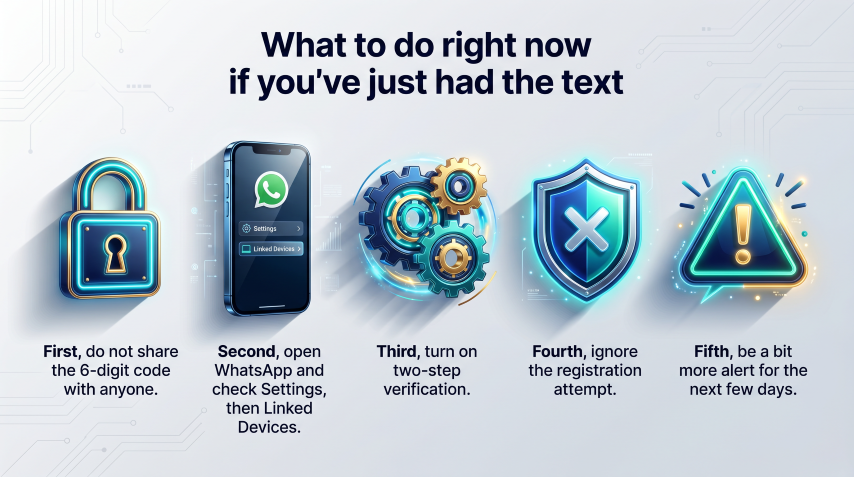
First, do not share the 6-digit code with anyone. Not now, not later, not ever.
Second, open WhatsApp on your phone and check Settings, then Linked Devices. Have a look at what’s listed. If anything is there you don’t recognise, log it out. If only your own devices show up, you’re clean.
Third, turn on two-step verification using the steps above. Do this now, while you’re thinking about it. Don’t put it off.
Fourth, ignore the registration attempt. You don’t need to “block” it or report it. The attempt fails on its own because you didn’t enter the code.
Fifth, be a bit more alert for the next few days. Whoever did this knows your number is active. You may get follow-up phishing texts pretending to be from WhatsApp, your bank, or a contact asking for the code. Treat anything urgent and money-related with extreme suspicion.
What if it’s already too late?
If you did forward the code, or you’re already locked out of your account, don’t panic but move quickly.
Try to log back in straight away by re-registering your number. WhatsApp will send a fresh code, and entering it will boot the attacker off. If two-step verification was already on with their PIN set, you’ll need to wait, which is one of several reasons to set this up before something goes wrong rather than after.
Then email support@whatsapp.com from your phone. Subject line: “Lost/Stolen: Please deactivate my account”. Include your number in international format, so for the UK that’s +44 followed by your mobile number without the leading zero. They will deactivate the account, which stops the attacker using it while you sort things out.
Warn your contacts. Send a message on another platform, or have a family member post in any group chats you share, telling people that any urgent money request from your WhatsApp is a scam. The faster you do this, the less damage gets done.
The bigger picture
These scams work because they’re built on panic. The text arrives, the heart races, the brain switches off, and the criminals are counting on you to react before you think.
The defence is boring. Set the PIN. Don’t share the code. Treat anything urgent and money-related as suspicious until proven otherwise. Do those three things and you’ve taken yourself out of the running for 99% of these attacks.
The criminals are lazy. They want easy wins. Make yourself even slightly difficult and they’ll move on to someone else. That’s the whole game.
So if you’ve had the text and you’re reading this with a slightly shaky cup of tea, take a breath. You’re fine. Now go and turn on two-step verification, and you’ll be even finer next time.
Walter
Leave a Reply