

I’ll be honest with you. I’ve spent more time rewriting emails than I care to admit. You know the drill: you write something, read it back, cringe at how it sounds, delete half of it, rewrite it again, wonder if you’ve been too formal or not formal enough, and then stare at the screen for another ten minutes before finally hitting send with a prayer that you haven’t accidentally insulted anyone or sounded like a complete numpty.
Well, here’s the thing. Those days are pretty much over, and I’m not even slightly sad about it.
Why AI Email Writing Tools Matter (More Than You Think)
Let me paint you a picture. The average office worker sends and receives about 121 emails per day. That’s 121 opportunities to second-guess yourself, to worry about tone, to fret over whether you’ve been clear enough or too blunt. It’s exhausting, frankly.
This is where AI email writer technology swoops in like a proper hero. These tools aren’t just fancy spell-checkers, they’re more like having a really clever colleague sitting next to you, one who’s brilliant with words and never gets tired or grumpy. They can take your rambling, half-formed thoughts and turn them into something that actually sounds professional. Or friendly. Or apologetic. Or whatever you need, really.
The importance here isn’t just about saving time, though that’s lovely. It’s about reducing the mental load. Every email you send is a tiny decision-making exercise, and by the end of the day, you’re knackered from all those micro-decisions. An AI writing assistant takes that weight off your shoulders, and suddenly you’ve got energy left for things that actually matter, like remembering to call your sister back or finally fixing that wobbly shelf.
What These Tools Actually Do (And What They Don’t)
Right, let’s get clear on this because there’s a lot of confusion floating about.
An AI email writer is designed to help you write better emails faster. It can take your rough draft and polish it up. It can adjust the tone from “slightly aggressive” to “diplomatically firm”. It can spot when you’ve been too wordy and trim the fat. It can even write entire emails from scratch if you give it a few prompts about what you need to say.
These tools are brilliant for everyday business communication, customer service responses, follow-ups, thank you notes, and those awkward emails where you need to say no without actually saying no. You know the ones I mean.
But here’s what they’re not: they’re not going to write your novel. They’re not going to craft deeply personal messages that require genuine emotional intelligence (though they’re getting better at sounding empathetic). They shouldn’t be used for sensitive HR matters where a human touch is absolutely essential. And they definitely shouldn’t be writing emails that require specialized knowledge they haven’t been trained on, like legal advice or medical information.
Think of AI writing tools as a brilliant assistant, not a replacement for your own judgment. They’re the supporting actor, not the lead.
The Old Days: Before AI Came to Save Us
Remember when we just had spell-check? That little red squiggle under misspelled words felt revolutionary back in the day. Before that, we had dictionaries and people who were just naturally good at spelling, and the rest of us muddled through.
Then came grammar checkers, which were about as useful as a chocolate teapot initially. They’d flag perfectly good sentences and miss glaring errors. I remember Microsoft Word’s grammar checker in the late 1990s suggesting changes that would make your writing sound like it was written by a particularly pedantic robot.
Email templates were another solution we tried. You’d have these pre-written responses saved somewhere, and you’d copy and paste them, then spend ages editing them to fit the actual situation. It was better than starting from scratch, but not by much.
The real problem was that none of these tools understood context. They couldn’t grasp what you were trying to say or who you were saying it to. They were like having a proofreader who only knew the rules but had no sense of style or purpose.
How We Got Here: The Evolution of AI Email Writing
Let me walk you through this journey, because it’s actually quite fascinating.
The Early Days: Basic Autocomplete
The first hints of AI in writing came with predictive text and autocomplete features. Your phone would guess what word you wanted next based on what you’d typed before. It was clever enough, but pretty basic. It was like having someone finish your sentences, except they only knew about five words and guessed wrong most of the time.
The Template Era: Smart Replies
Then came smart replies, pioneered by Gmail around 2017. These were short, pre-generated responses like “Thanks!” or “Sounds good!” that the system thought might be appropriate based on the email you received. Revolutionary? Not quite. But it was the first time AI was actually reading your emails and suggesting responses. It was like having training wheels on a bicycle, helpful but limited.
The Language Model Revolution
Everything changed when large language models came along. Without getting too technical, these are AI systems trained on absolutely massive amounts of text from the internet. They learned patterns in how humans write and communicate. GPT-3, released by OpenAI in 2020, was a game-changer.
Suddenly, AI could write coherent paragraphs that sounded genuinely human. It could understand context and nuance. It could adjust tone and style. This wasn’t just autocomplete on steroids, this was something fundamentally different.
Today: Specialized Email Assistants
Now we’ve got AI email writer tools that are specifically designed for email communication. Systems like Grammarly Go, Jasper, and built-in features in Gmail and Outlook use advanced AI to help you write emails. They can generate entire emails from bullet points, rewrite existing drafts in different tones, expand brief messages into fuller communications, or condense rambling emails into concise ones.
The benefit over previous versions is night and day. Instead of just catching spelling mistakes or offering generic templates, these tools actually understand what you’re trying to communicate and help you say it better. They’re context-aware, tone-sensitive, and genuinely useful.
How AI Email Writing Actually Works (Without the Jargon)
Let me explain this in a way that makes sense.
Imagine you’ve got a friend who’s read practically everything ever written on the internet. They’ve seen billions of emails, articles, books, and conversations. They’ve noticed patterns in how people communicate, what works and what doesn’t, how formal language differs from casual chat, how apologies are structured, how requests are made politely.
Now, when you ask this friend to help with an email, they draw on all that experience. You type something like “I need to tell my client the project will be late but keep it professional and apologetic,” and your friend thinks, “Right, I’ve seen thousands of emails like this. They usually start with an apology, then explain the situation, then offer a solution, then apologize again.”
That’s essentially what an AI writing assistant does, except instead of one friend, it’s more like having access to the collective writing knowledge of millions of people, all processed and organized by clever algorithms.
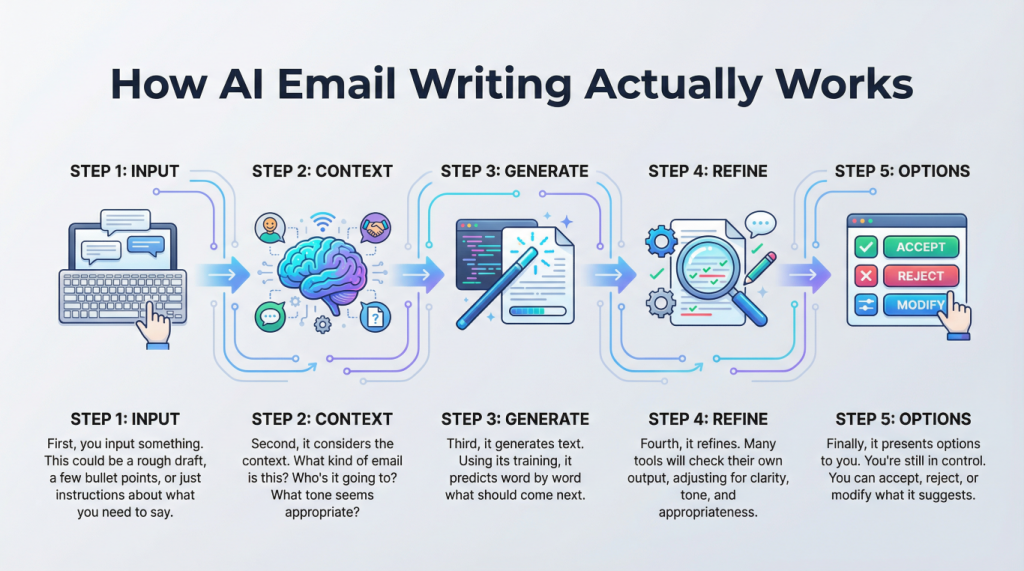
Here’s the step-by-step process:
First, you input something. This could be a rough draft, a few bullet points, or just instructions about what you need to say. The AI reads this and analyzes what you’re asking for.
Second, it considers the context. What kind of email is this? Who’s it going to? What tone seems appropriate? It’s making dozens of tiny decisions based on patterns it’s learned.
Third, it generates text. Using its training, it predicts word by word what should come next to create a coherent, appropriate message. It’s not copying from anywhere, it’s creating new text based on patterns.
Fourth, it refines. Many tools will check their own output, adjusting for clarity, tone, and appropriateness. It’s like doing a self-edit.
Finally, it presents options to you. You’re still in control. You can accept, reject, or modify what it suggests.
The whole process happens in seconds, which is rather remarkable when you think about it.
What’s Coming Next: The Future of AI Email Writing
I reckon we’re only scratching the surface here.
The next generation of AI writing tools will be even more personalized. They’ll learn your specific writing style and replicate it. Imagine an AI that writes emails that sound exactly like you, just better organized and clearer. It’ll pick up on your quirks, your favorite phrases, your typical sentence structure.
We’ll also see better integration with other tools. Your AI email writer will check your calendar, understand your relationship with the recipient based on past communications, and automatically adjust tone and content accordingly. It might even suggest the best time to send the email based on when the recipient typically responds.
Voice integration is coming too. You’ll be able to just talk about what you need to say, and the AI will convert that into a polished email. No typing required. This will be brilliant for people with mobility issues or anyone who just thinks better out loud.
There’s also the possibility of real-time collaboration, where AI helps both sides of an email conversation communicate more effectively, reducing misunderstandings and speeding up decision-making.
The technology will become invisible, woven into everything we do. You won’t think “I’m using an AI email writer” any more than you think “I’m using a spell-checker” now. It’ll just be how email works.
The Serious Bit: Security and Why You Should Care
Right, I need to have a proper chat with you about security because this matters.
When you use an AI writing assistant, you’re often sending your email content to a company’s servers where the AI processes it. That means someone else’s computer is reading your emails. Now, reputable companies have strong security measures and privacy policies, but you need to be aware of what you’re sharing.
Here’s the thing: never, and I mean never, put genuinely sensitive information into an AI tool unless you’re absolutely certain about their security practices. Client confidential information, personal data, financial details, anything that could cause real harm if it leaked, keep that out of AI tools unless they’re specifically designed and certified for handling such data.
Some AI writing tools store your data to improve their systems. Others promise not to. You need to read the privacy policy, boring as that is. Look for tools that are transparent about data handling, offer encryption, and comply with regulations like GDPR if you’re in the UK or Europe.
There’s also the risk of over-reliance. If you let AI write everything, you might accidentally send something that doesn’t quite capture what you meant, or worse, contains an error you didn’t catch because you didn’t read it carefully. Always review what the AI generates. You’re still responsible for what goes out under your name.
And here’s something people don’t think about enough: AI can sometimes “hallucinate” or make things up. It might reference a meeting that didn’t happen or mention details that aren’t quite right. This is rare with simple email writing, but it can happen. Your human judgment is the final safety net.
Wrapping This Up
Look, I’m not going to pretend that AI writing tools are perfect or that they’ll solve every communication problem you’ve ever had. They won’t. You’ll still need to think about what you want to say and why you’re saying it. You’ll still need to bring your own judgment, empathy, and common sense to the table.
But here’s what these tools will do: they’ll save you time, reduce stress, and help you communicate more effectively. They’ll catch you when you’re tired and your brain isn’t quite working properly. They’ll help you find the right words when you’re feeling stuck. They’ll make the daily grind of email communication just a bit more bearable.
I’ve been using AI email writer tools for a while now, and I can’t imagine going back. The amount of mental energy I’ve saved is substantial. I’m not spending twenty minutes agonizing over how to phrase a simple request anymore. I’m not lying awake at night wondering if an email came across wrong. The AI helps me get it right the first time, or at least close enough that I’m not starting from scratch.
The technology is here, it’s accessible, and it’s only getting better. Whether you’re running a business, managing a team, or just trying to keep up with your inbox, these tools can genuinely make your life easier.
So the next time you find yourself rewriting that email for the third time, maybe give an AI writing assistant a try. You might be surprised at how much you like having a tireless, patient, and rather clever helper at your side.
Just remember to read what it writes before you hit send. Trust me on that one.
Walter


Leave a Reply