
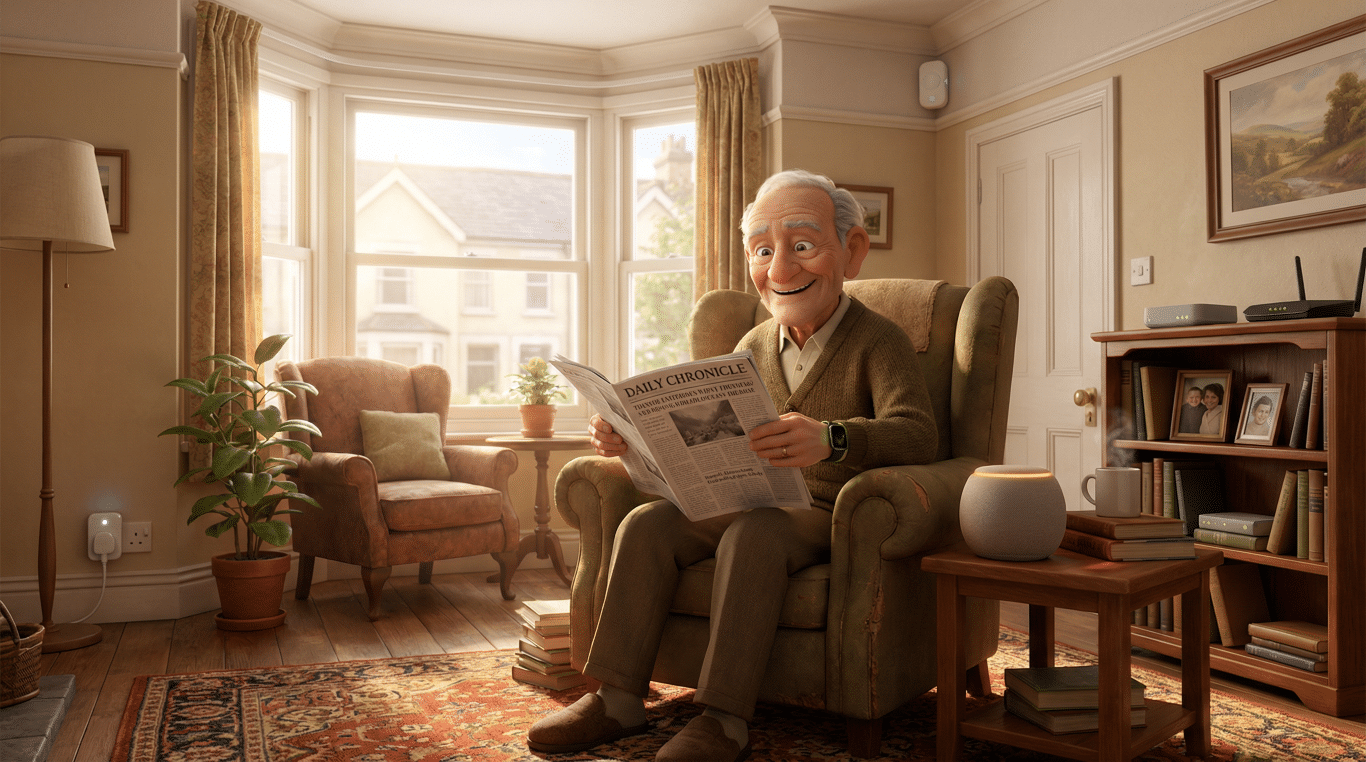
Getting older doesn’t mean you need to pack up your life and move into a facility where someone rings a bell for dinner. I’ve watched my own parents navigate this territory, and I’ve seen friends wrestle with the question of whether Mum or Dad can really manage on their own anymore. It’s emotional, it’s complicated, and frankly, it’s nobody’s favourite conversation to have over Sunday roast.
But here’s the thing that’s changed everything: technology has finally caught up with what we actually need. Not what some young designer in Silicon Valley thinks we need, but real, practical solutions that let people stay in their own homes safely. We’re talking about aging in place, and the tech that makes it possible is genuinely transformative.
The numbers tell a story worth hearing. According to AARP research, nearly 90% of adults over 65 want to stay in their homes as they age (AARP, “2021 Home and Community Preferences Survey” – High confidence). That’s not surprising, is it? Your home is where your memories live, where you know which floorboard creaks, where the morning light hits just right. But the worry, the legitimate, keeps-you-up-at-night worry, is about safety. What happens if someone falls? What if they forget to turn off the cooker? What if they need help and can’t reach the phone?
That’s exactly where smart home technology for seniors comes in, and I promise you, it’s not as complicated as it sounds.
What This Technology Actually Does (And Doesn’t Do)
When we talk about technology for aging in place, we’re not talking about robots that bathe you or some dystopian nightmare where a computer runs your life. We’re talking about practical tools that work quietly in the background, keeping you safe without making you feel watched or infantilised.
These systems do things like detect when someone has fallen and can’t get up. They notice if you haven’t moved around the house at your usual time in the morning. They can remind you to take medication, alert family members if something seems off, and even call for help automatically in an emergency. Some monitor whether doors and windows are secure, whether the stove has been left on, or if there’s smoke or carbon monoxide in the air.
What they don’t do is take away your independence or privacy. They don’t spy on you, they don’t judge your choices, and they don’t make decisions for you. Think of them more like a really attentive neighbour who checks in without being nosy, rather than a babysitter. The best senior safety devices are the ones you barely notice until you actually need them.
They’re also not a replacement for human connection, and this is important. Technology can alert your daughter that you’ve fallen, but it can’t give you a hug. It can remind you to take your pills, but it can’t have a cup of tea with you. It’s a safety net, not a substitute for family, friends, and carers.
How We Got Here: The Before Times
Cast your mind back to how things used to work. Not that long ago, really. If you were concerned about an elderly parent living alone, your options were pretty limited and honestly, a bit grim.
You could install one of those medical alert pendants, the ones with the big red button. “I’ve fallen and I can’t get up!” became a cultural punchline, but the technology behind it was actually quite revolutionary for its time. The problem was, you had to remember to wear it, you had to be conscious enough to press it, and you had to be within range of the base station. I knew someone whose mother fell in the garden, pendant around her neck, utterly useless because she was too far from the house.
Or you could ring every day, multiple times a day, to check in. Which is lovely, except it’s also exhausting for everyone involved and doesn’t actually help if something happens between phone calls. My friend Sarah used to call her dad three times a day, and she still worried herself sick every single night.
Some families installed cameras, which, let’s be honest, feels invasive for everyone. Would you want your kids watching you potter around your own home? I wouldn’t.
Or, and this was often the reluctant conclusion, you’d start looking at assisted living facilities. Not because it was what anyone wanted, but because it felt like the only way to ensure safety.
The technology we had was better than nothing, but it put the burden on the person who needed help to actively seek it. And that’s exactly backwards, isn’t it?
The Evolution: From Panic Buttons to Smart Homes
The journey from those basic medical alert systems to today’s smart home technology for seniors has been fascinating, and it’s happened faster than you might think.
The First Generation: Medical Alert Systems (1970s-1990s)
The original medical alert systems were genuinely groundbreaking when they appeared in the 1970s. You wore a pendant or wristband with a button, and when you pressed it, it connected through your phone line to a monitoring centre. Someone would answer, talk to you through a speaker in the base unit, and send help if needed. Simple, effective, but limited. You had to be able to press the button, you had to be within range, and you had to have a landline. Still, for many people, it was life-changing. (Source: “History of Medical Alert Systems,” Medical Alert Buyer’s Guide – Medium confidence)
The Second Generation: Mobile Medical Alerts (2000s)
As mobile phone technology improved, so did medical alerts. Suddenly, you could have a pendant that worked outside the home, using GPS to locate you. This was brilliant for people who were still active and out in the community. The limitation? You still had to press the button, and the devices were often clunky. My aunt had one that was so large and obvious, she refused to wear it because she said it made her look “ancient.” Bit counterproductive, that.
The Third Generation: Automatic Fall Detection (2010s)
This is where things got clever. Engineers worked out how to build sensors that could detect the specific motion pattern of a fall, different from sitting down quickly or bending over. The device would sense the fall and automatically call for help, even if you were unconscious or couldn’t reach the button. The technology used accelerometers and algorithms, the same basic tech that lets your smartphone know which way up it is. Game-changing, truly. (Source: Various medical alert company specifications – High confidence)
The Fourth Generation: Smart Home Integration (2015-Present)
And now we’ve arrived at the current era, where aging in place technology has become part of the broader smart home ecosystem. Instead of one device doing one thing, you’ve got multiple sensors and devices working together, learning your patterns, and spotting problems before they become emergencies.
Motion sensors track your movement through the house. If you usually get up and make tea at 7am, and one morning there’s no movement by 10am, the system notices. Door sensors can alert family if you leave the house at an unusual time, like 3am. Smart plugs can automatically turn off appliances that have been left on too long. Cameras with AI can detect falls without recording video, preserving privacy. Voice assistants can call for help, turn on lights, or remind you about medications, all without pressing a button.
The benefit over previous generations is enormous. It’s proactive rather than reactive, it’s less intrusive, and it provides a complete picture of wellbeing rather than just responding to emergencies.
How It All Works: Behind the Scenes
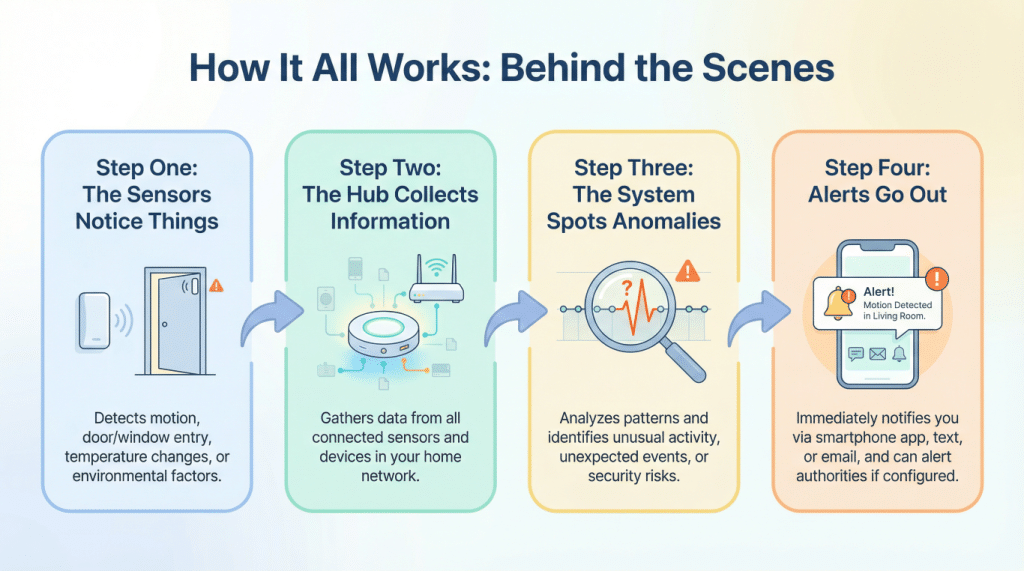
Right, let’s demystify this. I’m going to walk you through how a typical smart home safety system actually works, step by step, without any jargon or nonsense.
Step One: The Sensors Notice Things
Around your home, you’ve got various small sensors. Some detect motion, some detect whether doors are open or closed, some detect temperature or smoke or carbon monoxide. There might be a small camera with special software that can tell if someone has fallen, but crucially, it doesn’t record video or send images anywhere. It just recognises the shape and position of a fallen person.
These sensors are usually small, often battery-powered, and they stick to walls or sit on shelves. You barely notice them after a while. They’re constantly monitoring, but in a passive way. Think of them like the way you might notice if your neighbour’s lights are on at an unusual time. You’re not spying, you’re just aware.
Step Two: The Hub Collects Information
All these sensors send their information to a central hub, which is basically a small box that plugs into your internet router. The hub is the brain of the operation. It receives all the data from the sensors and starts to build a picture of what’s normal for you.
Over the first few weeks, it learns your patterns. You usually wake up around 7am. You typically go to bed around 11pm. You often go out on Tuesday and Thursday afternoons. The bathroom light usually goes on a couple of times during the night. None of this information leaves your home yet, it’s just the system learning what normal looks like for you.
Step Three: The System Spots Anomalies
Once the system knows what’s normal, it can spot what’s not. If you haven’t moved around the house by 10am when you’re usually up by 7am, that’s unusual. If a door opens at 2am when you never usually go out at night, that’s worth noting. If there’s no activity at all for many hours during the day, something might be wrong.
The clever bit is that the system doesn’t panic at every little change. It’s looking for patterns that genuinely suggest a problem, not just a lazy Sunday morning or a day when you’re feeling under the weather and staying in bed.
Step Four: Alerts Go Out
When the system detects something that seems genuinely concerning, it sends an alert. This might go to family members through an app on their phones. It might go to a monitoring service who can call you to check if you’re alright. In serious cases, like if a fall is detected, it might call emergency services directly.
The beauty of modern systems is that you can customise all of this. Maybe you want minor alerts to go to your daughter, but only emergency alerts to actually call 999. Maybe you want a grace period where the system asks if you’re okay before alerting anyone else. It’s your home, your rules.
Step Five: Everyone Stays Informed
Family members can usually check in through an app to see that everything’s normal, without being intrusive. They might see “Activity detected: All normal” without seeing any details about what you’re actually doing. It’s the perfect balance of reassurance and privacy.
What’s Coming Next: The Future of Aging in Place
I’ve been following the developments in this field, and I’m genuinely excited about what’s coming. Not in a “flying cars” sort of way, but in a “this will actually make people’s lives better” way.
Health Monitoring Without Wearables
Researchers are developing sensors that can monitor your heart rate, breathing, and even blood pressure without you wearing anything at all. They use radar technology, similar to what bats use, to detect tiny movements in your body from across a room. You’re just sitting in your favourite chair, and the system is making sure your vital signs are stable. (Source: Various research papers on contactless health monitoring – Medium confidence)
Predictive AI That Spots Problems Early
The next generation of systems won’t just react to falls or emergencies. They’ll notice subtle changes in behaviour that might indicate the early stages of illness or cognitive decline. Walking a bit slower than usual? Taking longer to do routine tasks? The system might suggest a check-up with your doctor before anything serious develops. It’s like having a really observant friend who notices you’re not quite yourself.
Integration With Healthcare
We’re moving towards systems that can share relevant information directly with your GP or healthcare team, with your permission of course. Imagine your doctor being able to see that you’ve been less active than usual, or that you’ve been getting up more frequently at night, and using that information to provide better care.
Better Voice Control
Voice assistants are getting dramatically better at understanding older voices, accents, and speech patterns affected by conditions like Parkinson’s. The frustration of saying “Alexa, call my daughter” five times and having it play a Adele song instead will hopefully become a thing of the past.
Security: The Bit You Can’t Ignore
Now, I need to be serious for a moment because this matters. Any technology connected to the internet can potentially be hacked, and senior safety devices are no exception. I’m not trying to scare you, but you need to go into this with your eyes open.
The risks are real. Hackers could potentially access cameras, listen through microphones, or even disable safety systems. There have been cases of people hacking into baby monitors and smart home devices. It’s creepy, it’s wrong, and it’s something you need to protect against. (Source: Various cybersecurity reports on IoT device vulnerabilities – High confidence)
Here’s what you need to do, and I’m going to be very clear about this:
First, change all default passwords immediately. When you get any device, it comes with a password like “admin” or “password123.” Everyone knows these defaults. Change them to something strong and unique. I know it’s a pain, but it’s essential.
Second, keep everything updated. When your devices tell you there’s a software update available, don’t ignore it. These updates often fix security vulnerabilities. Yes, it’s annoying when you just want to watch Countdown, but it’s important.
Third, use a separate network for your smart home devices if possible. Many modern routers let you create a guest network. Put all your smart home gadgets on that network, separate from your computer and phone. That way, if someone does hack your smart doorbell, they can’t access your banking information.
Fourth, be very careful about which companies you trust. Research the manufacturer. Look for companies with good security track records. Read reviews. If a device seems too cheap or comes from a company you’ve never heard of, be cautious.
Fifth, understand what data is being collected and where it’s going. Read the privacy policy. I know, I know, nobody reads privacy policies. But for devices monitoring your home and health, you really should. Make sure you’re comfortable with what information is being stored and who can access it.
The good news is that reputable companies in the aging in place technology space take security seriously. They use encryption, secure servers, and regular security audits. But you still need to do your part.
Bringing It All Together
So here we are, at the end of our journey through the world of smart home technology for seniors. I hope I’ve convinced you that this isn’t science fiction or something impossibly complicated. It’s practical, available now, and genuinely life-changing for many people.
The technology that helps you age in place safely has evolved from simple panic buttons to sophisticated systems that watch over you without watching you, if that makes sense. They learn your patterns, spot problems early, and alert the right people when something’s wrong. They let you stay in your own home, maintain your independence, and give your family peace of mind.
Are they perfect? No. There are security concerns you need to take seriously. There’s a learning curve, though it’s gentler than you might think. And they’re not cheap, though prices are coming down as the technology becomes more common.
But for many people, these systems are the difference between staying in their own home and having to move somewhere they don’t want to be. That’s not a small thing. That’s everything.
I think about my own future sometimes. I’m not there yet, but I will be. And when that time comes, I want to be in my own home, surrounded by my own things, living life on my own terms. This technology makes that possible in a way it simply wasn’t for previous generations.
The future of aging in place is about choice, dignity, and safety working together rather than competing with each other. It’s about technology that serves people rather than the other way around. And honestly, that’s the kind of future I can get behind.
If you’re considering this technology for yourself or someone you love, take your time. Research your options. Talk to companies, read reviews, maybe try a basic system first before going all-in. But don’t dismiss it out of hand because it seems too technical or complicated. It’s really not, and it might just be the key to staying exactly where you want to be: home.
Walter
Leave a Reply