
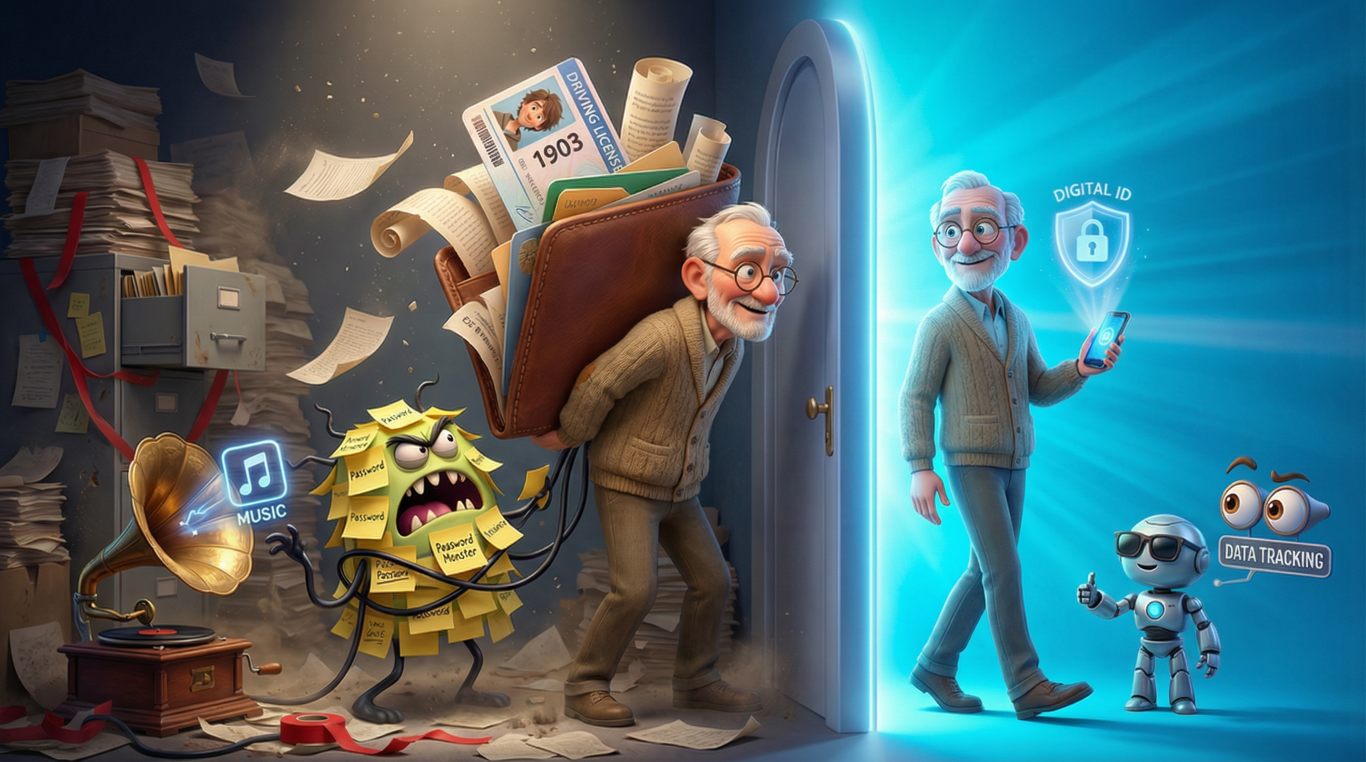
I’ll be honest with you. When I first heard the term “digital ID,” I thought it was just another bit of tech jargon that would blow over like those QR codes we all ignored for years (until a pandemic forced us to care). But here’s the thing: digital identity is actually a massive deal, and it’s going to change how we prove who we are in ways that’ll make your old library card look positively medieval.
So let me take you on a journey through this world of digital IDs. I promise to keep it simple, relevant, and dare I say, entertaining. Because if we’re going to talk about something that might replace your driving licence and passport, we should at least make it interesting.
Why Digital Identity Matters More Than You Think
Remember the last time you had to prove who you were? Maybe it was at the bank, or when you picked up a parcel, or when you tried to convince someone you really were old enough to buy that bottle of wine (even though you’ve got grandchildren, for heaven’s sake). Every single time, you probably fumbled through your wallet looking for the right card, worried you’d left it at home, or discovered it had expired last month.
Now multiply that frustration by every service you use, every website you visit, every government department you need to deal with. It’s exhausting, isn’t it? And that’s precisely why digital ID is such an important technology. It’s not just about convenience, though that’s a lovely bonus. It’s about creating a secure, reliable way to prove you’re you in an increasingly digital world.
Think about it this way. We’ve moved our shopping online, our banking online, our socialising online (thanks again, pandemic), but we’re still using identity systems designed for a world where you walked into a building and handed someone a piece of paper. It’s like trying to play a Spotify playlist on a gramophone. Something’s got to give.
What Digital IDs Are Actually Used For (And What They’re Not)
Let me clear something up , when I say digital ID, I’m not talking about your Facebook profile or your email address. Those are accounts, not identities. A proper digital identity is a secure, verified way of proving who you are online, backed by the same level of trust (or hopefully more) than your physical documents.
So what are digital IDs used for? Well, imagine being able to prove your age without showing your entire date of birth and address. Imagine opening a bank account from your sofa without posting off photocopies of your passport. Imagine applying for a job and securely sharing your qualifications without printing out certificates. Imagine accessing NHS services, filing your taxes, or applying for a Blue Badge without drowning in paperwork.
That’s the promise. Digital IDs let you prove specific things about yourself (your age, your address, your right to work) without revealing everything else. It’s like having a bouncer who only needs to know you’re over 18, not your entire life story.
Now, what they’re NOT used for (or shouldn’t be, if we do this right). They’re not a tracking device. They’re not a way for the government to monitor your every move. They’re not a replacement for human interaction when you actually need it. And they’re definitely not an excuse to force everyone online when digital exclusion is still a real problem.
The key difference is control. A good digital identity system lets you decide what to share and when. It’s your identity, digitally enabled, not someone else’s database entry.
The Old Ways: What We Had Before Digital Identity
Let’s take a little trip down memory lane. How did we prove who we were before all this digital nonsense?
For most of human history, the answer was simple: people knew you. You lived in a village, everyone knew your face, and that was that. Your identity was your reputation, literally. Then we invented cities and suddenly you couldn’t know everyone, so we needed something more.
Enter the paper document. Birth certificates appeared in England in 1837 (though they’d been around in parish records long before). Passports became standardised after World War I. The driving licence you’ve got in your wallet dates back to 1903 in the UK, though it looked rather different then (no photo until 1998, believe it or not).
These documents worked brilliantly for their time. They were physical, hard to forge (well, harder than just lying), and created a paper trail. But they had problems. They could be lost, stolen, forged, or simply left at home when you needed them most. And they were designed for a world where you proved your identity in person, face to face.
Then came the internet, and suddenly we needed to prove who we were to people we’d never meet, in places we’d never visit, for services that existed only in cyberspace. We tried to make the old system work. We photocopied documents. We posted them off. We held them up to webcams. It was like trying to fit a square peg into a round hole while blindfolded and standing on one leg.
We also created a mess of usernames and passwords. I bet you’ve got dozens of them. I certainly do. Each one is supposed to prove you’re you, but really they just prove you can remember (or reset) a password. It’s not identity verification, it’s memory verification, and my memory isn’t what it used to be.
The Evolution of Digital Identity: From Simple to Sophisticated
The journey to what are digital IDs today has been long and, frankly, a bit bumpy. Let me walk you through it in a way that actually makes sense.
Version 1: The Username and Password Era (1960s-1990s)
This was the digital Stone Age. You created an account, you picked a username, you chose a password. That was it. No verification, no security questions, no two-factor anything. You could claim to be anyone. The internet was a bit like a masquerade ball where everyone wore whatever mask they fancied.
The benefit? It was simple. The problem? It was too simple. Security was terrible, but then again, we weren’t doing our banking online or storing our entire lives in the cloud.
Version 2: The Verification Email Era (1990s-2000s)
Someone had the bright idea that maybe we should check if you are who you say you are. Enter the verification email. You’d sign up, they’d send you an email, you’d click a link. At least now they knew you controlled that email address.
This was a step up. It added a layer of verification. But it still didn’t prove you were really you. It just proved you had access to an email account, which you could have created five minutes earlier using completely false information.
Version 3: The Document Upload Era (2000s-2010s)
As online services became more serious (banking, government services, healthcare), they needed more proof. So they asked you to upload photos of your documents. Your passport, your driving licence, your utility bills.
This was better. At least now there was some connection to your real-world identity. But it was clunky. You had to take photos or make scans. The quality was often terrible. Someone had to manually check these images, which was slow and expensive. And you were sending sensitive documents all over the internet, which made security experts break out in hives.
Version 4: The Two-Factor Authentication Era (2010s)
Finally, someone realised that passwords alone were rubbish. So they added a second factor, usually your mobile phone. You’d log in with your password, then they’d send you a code via text. This proved you had both the password and the phone.
This was genuinely better. It made accounts much harder to hack. But it was still about protecting accounts, not verifying identity. And it was another step, another code to type in, another moment of friction.
Version 5: The Modern Digital Identity Era (2020s-present)
Now we’re getting to the good stuff. Modern digital identity systems combine the best of everything that came before and add some clever new tricks.
These systems use verified credentials. Think of them like digital versions of your physical documents, but smarter. They’re cryptographically secured (that means they use really complex maths to make them nearly impossible to forge). They’re issued by trusted organisations (government departments, banks, universities). And they’re controlled by you.
The benefit over previous versions? You prove your identity once, properly, with the organisation that issues your credential. Then you can use that verified credential over and over again, sharing only what’s needed. It’s like having a bouncer who’s already checked your ID vouch for you at every other venue, without you having to show your documents again.
Plus, these systems can prove things about you without revealing the underlying data. You can prove you’re over 18 without showing your date of birth. You can prove you live in a certain area without showing your exact address. It’s called “selective disclosure,” and it’s rather brilliant.
How Digital Identity Actually Works: A Step-by-Step Journey
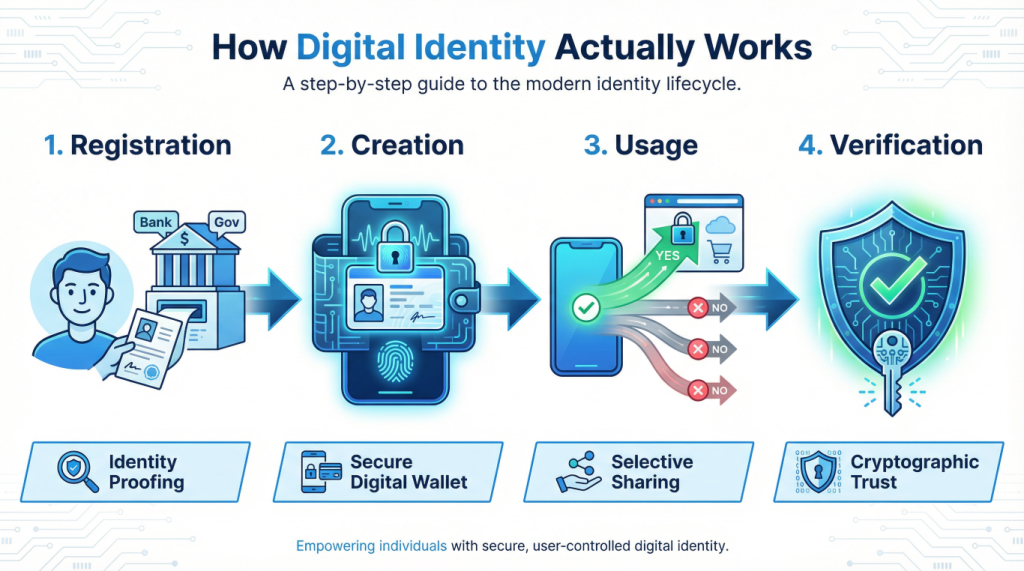
Right, let’s get into the mechanics. Don’t worry, I’ll keep this simple. Think of digital ID like a very sophisticated club membership system.
Step 1: Registration and Verification
First, you need to prove who you are to a trusted organisation. This might be a government department, your bank, or another verified identity provider. This is the only time you need to go through the full verification process. You’ll provide your documents, answer security questions, maybe even do a video call or visit in person.
They check everything thoroughly. They’re essentially saying, “Yes, we verify that this person is who they claim to be.” This is called “identity proofing,” and it’s the foundation of everything else.
Step 2: Creating Your Digital Identity
Once you’re verified, you get a digital identity. This isn’t just another account. It’s a secure digital credential that contains verified information about you. Think of it like a digital passport, but one that’s cryptographically secured and can be used across multiple services.
This credential is stored securely, usually in a digital wallet on your phone or computer. Only you can access it, typically using biometrics (your fingerprint or face) or a strong PIN.
Step 3: Using Your Digital Identity
Now comes the clever part. When a service needs to verify something about you, you use your digital identity to prove it. Let’s say you’re signing up for a new online service that needs to verify you’re over 18.
The service sends a request to your digital wallet: “Please prove you’re over 18.” Your wallet shows you this request. You decide whether to approve it. If you do, your wallet sends back a verified response: “Yes, this person is over 18.” Crucially, it doesn’t send your date of birth, your name, or any other information. Just the answer to the specific question.
Step 4: The Verification
The service receives this response and can cryptographically verify it came from a trusted source and hasn’t been tampered with. They don’t have to trust you. They trust the mathematics and the organisation that originally verified your identity.
It’s like having a letter of reference that can’t be forged and only reveals exactly what the reader needs to know.
The beauty of this system is that you’re in control. You decide what to share and when. The service only gets what it needs. And because everything is cryptographically secured, it’s much harder to fake or steal than traditional documents.
The Future of Digital Identity: What’s Coming Next
I’ll be straight with you. I don’t have a crystal ball, and anyone who claims to know exactly what the future holds is probably selling something. But I can see the direction we’re heading, and it’s quite interesting.
Within the next few years, I expect digital IDs will become as common as contactless payment. Your phone will become your primary way of proving who you are. Not because someone forced you to use it, but because it’ll be so much more convenient than carrying cards and remembering passwords.
We’ll see digital identities that work across borders. Imagine travelling to Europe and being able to prove your identity, your travel insurance, your accommodation bookings, all from one secure digital wallet. No more printing out confirmations or worrying about losing your passport in a foreign city.
The workplace will transform too. Starting a new job will mean securely sharing your verified qualifications and right-to-work status digitally, rather than photocopying documents on your first day. Background checks will be faster and more reliable.
Healthcare is another big one. Imagine having a digital identity that securely holds your NHS number, your vaccination records, your allergies, and your emergency contacts. In an emergency, paramedics could access what they need to save your life, with your prior consent and with everything logged for your review.
But here’s what I really hope for: a future where digital identity increases inclusion rather than creating new barriers. Where having a digital ID makes it easier to access services, not harder. Where the technology serves people, not the other way around.
Security, Vulnerabilities, and Why You Should Pay Attention
Now, I need to have a serious word with you about security. I know, I know, it’s not the fun part. But it’s possibly the most important part, so bear with me.
Digital IDs are, by design, more secure than physical documents. They use encryption, they can’t be photocopied, and they leave an audit trail. If someone tries to use your digital identity, you’ll know about it. Try getting that with a stolen driving licence.
But, and this is a big but, they’re not invulnerable. Nothing is. Here’s what you need to watch out for.
Your Device is Your Weak Point
If your digital identity lives on your phone, then your phone becomes incredibly valuable. Lose it, and someone might try to access your identity. This is why biometric security (fingerprint, face recognition) is so important. It’s not perfect, but it’s a lot better than a four-digit PIN.
My advice? Treat your phone like you’d treat your wallet, your passport, and your house keys all rolled into one. Because that’s essentially what it is now.
Phishing Never Goes Away
Scammers are clever. They’ll send you messages pretending to be from your bank, the government, or your identity provider, asking you to “verify” your digital identity. Don’t fall for it. Legitimate services will never ask you to share your credentials via email or text.
Remember: you control your digital identity. You approve what gets shared. If someone’s asking you to hand over control, it’s almost certainly a scam.
The Centralisation Risk
Here’s a concern that keeps security experts awake at night. If everyone’s digital identity is stored in one central system, that system becomes an incredibly attractive target for hackers. It’s all your eggs in one very valuable basket.
This is why the best digital identity systems are decentralised. Your credentials are stored with you, on your device, not in some massive central database. It’s much harder to steal a million identities when they’re not all in one place.
The Human Factor
Technology can be brilliant, but humans make mistakes. We choose weak PINs. We ignore security updates. We click on dodgy links when we’re tired or distracted.
The future of digital identity security isn’t just about better technology. It’s about designing systems that work with human nature, not against it. Systems that are secure by default, that make the safe choice the easy choice.
What You Should Do
I’m not trying to scare you off digital identity. Honestly, I think it’s a positive development. But I want you to go into it with your eyes open. Here’s my practical advice:
Use strong authentication on your devices. Biometrics if you can, long PINs if you must. Keep your devices updated with the latest security patches. Be suspicious of any request to share your identity credentials, especially if it comes via email or text. Understand what you’re sharing and why before you approve any request. And keep track of where you’ve used your digital identity, so you’ll notice if something odd happens.
Wrapping This All Up
So, what are digital IDs really? They’re the next evolution in how we prove who we are. They’re not just digital versions of physical documents. They’re smarter, more secure, and more respectful of your privacy when done right.
Are they perfect? No. Will there be bumps along the way? Absolutely. Should you be cautious and informed? Yes, definitely.
But here’s what I genuinely believe. The world is digital now, whether we like it or not. We can either try to force old analogue systems to work in this new world, or we can build new systems designed for how we actually live today. Digital identity, done properly, is the latter.
The key phrase there is “done properly.” That means systems that put you in control. That respect your privacy. That include everyone, not just the tech-savvy. That have proper oversight and regulation. That remain optional where possible, with alternatives for those who can’t or won’t use them.
We’re at the beginning of this journey, not the end. The digital IDs we have in ten years will probably look quite different from what we’re building today. That’s okay. That’s how technology works. We learn, we improve, we adapt.
My hope is that when you hear about digital identity in the news, or when you’re offered the chance to use one, you’ll have a better understanding of what it actually is. Not some scary surveillance tool, not some magical solution to every problem, but a practical technology that could make your life a bit easier and a bit more secure.
And really, in a world where we’re constantly being asked to prove who we are, that doesn’t sound too bad, does it?
Walter
Leave a Reply